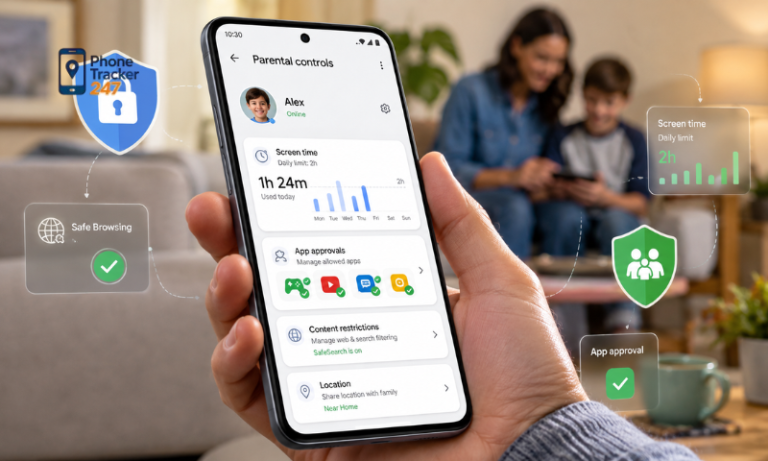
The internet can feel like a busy city with useful places on every corner, but hidden between them are doors children should not open too early. That is why many parents are searching for practical ways to block inappropriate websites before a simple tap becomes a real problem. The good news is that you do not need to watch every second of your child’s screen time to create a safer digital environment.
With the right mix of parental controls, browser settings, family rules, and transparent monitoring, you can reduce online risk while still helping your child build healthy habits. Let’s find out more in this article with PhoneTracker247.
What Counts as Inappropriate Websites on a Child’s Phone
Before you block harmful content, it helps to define what inappropriate websites actually include. Many parents think only about adult websites, but the risk is broader and often more deceptive.
Common types of inappropriate websites parents should know
Not all unsafe websites look dangerous at first glance. Some appear through ads, pop-ups, or links inside apps your child already uses.
- Adult and explicit websites
These are usually the first category parents want to block. They expose children to sexual content that is not age-appropriate and can affect emotional development, boundaries, and expectations. - Gambling and betting websites
These sites may look like games, but they can normalize risky behavior early. Some also push aggressive ads, fake rewards, and paid sign-ups. - Violent or disturbing content
Some websites promote graphic violence, cruelty, or shocking media designed to trigger strong reactions. Repeated exposure can shape how children process fear, harm, and empathy. - Scam and phishing websites
These pages trick users into downloading malware, sharing passwords, or entering payment information. Children are often easier targets because they click quickly and trust familiar-looking designs. - Hate, extremist, or toxic communities
Some websites spread harmful ideologies, bullying language, or manipulative content. These spaces can influence young users before parents even realize what they are reading.
Why children still reach these websites by accident
Parents often assume a child must search for harmful content directly, but that is not always what happens. In many cases, exposure starts with ordinary online behavior.
- Pop-up ads and redirects can open unsafe pages from gaming, streaming, or download sites.
- Social media links may lead to external pages with no real content filtering.
- Search suggestions can push misleading terms that curious children click without understanding.
- Shared devices may already contain browser history, bookmarks, or saved tabs.
- Simple curiosity can drive children to explore topics before they understand the risks.
The real risks behind inappropriate websites
The problem is not only what children see in the moment. The greater issue is what repeated exposure can normalize over time.
- Emotional confusion may happen when children see content they cannot process.
- Unsafe online behavior can develop through imitation, secrecy, or risky curiosity.
- Cybersecurity threats increase when a child clicks fake downloads or scam forms.
- Digital habits worsen when harmful content becomes part of routine browsing.
See more: Top 10 Best iOS Parental Control Apps for Effective Child Protection
Why Blocking Inappropriate Websites Matters More Than Ever
Blocking inappropriate websites is not about fear-based parenting. It is a practical way to reduce exposure while teaching children how to use technology with more awareness and caution.
Children are using phones earlier and more often
Many children now use smartphones for school, games, messaging, videos, and search. That means the window of exposure is larger than it used to be. Even a short period of unsupervised browsing can lead to unsafe pages through ads, autoplay content, or shared links.
- More screen time increases the number of chances for accidental exposure.
- More apps create more pathways to browser-based content.
- More independence means parents cannot rely on physical supervision alone.
Manual supervision is no longer enough
Watching over your child’s shoulder may work when they are very young, but it becomes less effective over time. Children move between browsers, apps, private tabs, and in-app web pages quickly.
- Private browsing modes can hide activity.
- Multiple browsers make one-device oversight harder.
- App-based browsing often bypasses what parents expect to monitor.
Prevention works better than reaction
Once a child has already seen harmful content, the conversation becomes harder. Blocking tools do not replace parenting, but they give you a useful first line of defense.
- Prevention lowers exposure before a problem becomes a pattern.
- Filters reduce risk during ordinary phone use.
- Early protection supports healthier habits in the long term.

Best Ways to Block Inappropriate Websites on Your Child’s Phone
There is no single setting that solves everything. The strongest setup combines built-in controls, browser filtering, device rules, and regular review.
Use built-in parental controls on iPhone and Android
Start with the tools already available on your child’s phone. They are easy to access and useful for limiting web content.
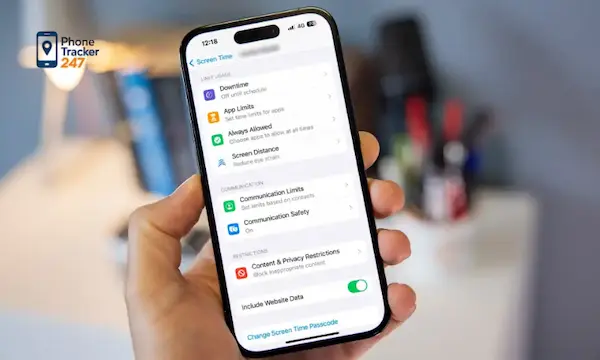
- On iPhone, use Screen Time and Content Restrictions
You can limit adult websites, restrict app installations, and control web access through built-in settings. - On Android, use Family Link or device-level controls
These tools help manage app access, browsing behavior, and account-level restrictions. - Limit unknown apps and browsers
Children may switch to less restricted browsers if the default one is blocked. Keep the number of browser apps small and reviewed. - Control app downloads
Some apps contain internal browsers that open unsafe pages. Restricting app installs reduces those side doors.
Turn on safe browsing and search filters
Blocking websites at the device level is stronger when it is paired with safer search behavior. Search engines and browsers can reduce exposure before a child even opens a harmful page.
- Enable SafeSearch on supported search platforms.
- Use child-friendly browsers when appropriate for younger children.
- Disable unrestricted browsing tools that weaken your filtering setup.
- Review incognito loopholes where possible, especially on shared devices.
Block specific URLs and website categories
Some harmful websites are best blocked directly, while others should be restricted by category. A mix of both gives broader protection.
- Block known harmful URLs your child has already reached or searched for.
- Use category filters for adult content, gambling, and malicious domains.
- Update block lists regularly because new websites appear all the time.
- Review exceptions carefully so educational content is not blocked by mistake.
How to Monitor Browsing Activity in a Safe and Ethical Way
Blocking is useful, but it does not always explain patterns. Transparent monitoring helps parents spot repeated risk while keeping the focus on safety instead of secrecy.
What parents should monitor besides blocked websites
A child’s browser activity often tells a bigger story than one blocked page. Looking at patterns helps you respond more calmly and accurately.
- Browser history trends show repeated curiosity or avoidance behavior.
- Time spent in browsers may reveal late-night or unsupervised usage.
- Suspicious domains can point to scam or explicit content risks.
- App usage patterns sometimes connect directly to unsafe browsing behavior.
How PhoneTracker247 can support digital safety
PhoneTracker247 is positioned as a privacy-first, consent-based monitoring platform built for safety, device oversight, and lawful use rather than covert spying. That makes it more suitable for families who want transparent monitoring rules in place. The platform centers on phone tracking, app activity monitoring, browser-related oversight, and broader device safety features, which can help parents understand online behavior more clearly when used ethically and with consent.
- Monitor digital activity in one place
Parents can review browsing-related behavior as part of a broader safety process. - Support consistent device oversight
Instead of relying on guesswork, families can use clearer signals to discuss online behavior. - Keep monitoring transparent
PhoneTracker247 emphasizes legal and consent-based use, which fits a healthy family safety model.
How to balance child safety and privacy
The goal is not to secretly inspect every click. The goal is to create a system your child understands and respects.
- Explain the rules clearly before monitoring begins.
- Focus on safety concerns rather than total control.
- Review issues together when something risky appears.
- Adjust controls by age as your child becomes more responsible.
Warning Signs Your Child May Be Accessing Inappropriate Websites
Parents often notice behavior changes before they find anything in browser history. These signals do not prove a problem, but they can tell you where to look next.
Behavioral signs at home
Behavior often shifts first when children feel confused, curious, or defensive about online activity.
- Hiding the screen quickly when someone walks by
- Becoming secretive about phone use
- Showing mood changes after screen time
- Staying up late with unusual device activity
- Reacting defensively to simple questions about browsing
Technical signs on the phone
Devices also leave clues when browsing becomes risky or hidden.
- Deleted browser history with no clear reason
- Unknown browser apps installed recently
- Frequent incognito mode or private tabs
- Random redirects and suspicious notifications
- Slower performance after unsafe downloads or pop-ups
When conversation matters more than another restriction
More blocking is not always the best next step. Sometimes a calm conversation helps more than one extra filter.
- Ask without accusation so your child stays open.
- Explain the risk clearly instead of using fear.
- Set the next rule together so they understand the reason behind it.
Practical Tips to Keep Kids Away from Inappropriate Websites
A safer phone environment comes from both technology and routine. Settings matter, but family habits matter just as much.
- Keep devices in shared spaces during certain hours
This reduces late-night browsing and gives younger children more structure. - Create age-appropriate screen rules
Children respond better when expectations are simple and consistent. - Review apps that open web content inside them
Games, chat apps, and video platforms often contain hidden browsing paths. - Teach your child what to do after seeing unsafe content
Leaving the page, telling an adult, and avoiding repeated clicks are practical skills. - Update device software and browser settings regularly
Outdated systems can weaken filtering and increase security risks.

Mistakes Parents Make When Trying to Block Inappropriate Websites
Many blocking efforts fail because they focus on one tool and ignore the bigger system. A few common mistakes can leave gaps without parents realizing it.
- Relying on one blocker only
One setting rarely covers search, apps, private browsing, and redirects at the same time. - Ignoring in-app browsers
A child may access web content through social or gaming apps without using the main browser. - Focusing only on adult content
Scam, gambling, and violent websites are also serious risks. - Monitoring secretly
Hidden monitoring can damage trust and create bigger family conflict later. - Never reviewing the setup again
Children grow, habits change, and settings need regular adjustment.
Conclusion
Learning how to block inappropriate websites on your child’s phone is not about building a wall around the internet. It is about creating a safer path through it. The best approach combines parental controls, safer browsing settings, targeted website blocking, and transparent monitoring that supports trust instead of fear. When parents pair those tools with open communication, children are more likely to build healthier digital habits that last.
Protect your child’s phone with a system that is simple, clear, and consistent. Use the right controls, review online behavior regularly, and choose transparent safety tools like PhoneTracker247 to support smarter digital parenting.
For daily updates, subscribe to PhoneTracker’s blog!
We may also be found on Facebook!
FAQs – Inappropriate Websites
1. What are inappropriate websites?
They are sites with adult, violent, gambling, scam, or harmful content.
2. Why should parents block inappropriate websites?
Blocking helps reduce harmful online exposure.
3. Can kids reach unsafe websites by accident?
Yes, through pop-ups, ads, redirects, or shared links.
4. How do I block inappropriate websites?
Use parental controls, SafeSearch, and website filters.
5. Can iPhone block inappropriate websites?
Yes, use Screen Time content restrictions.
6. Can Android block inappropriate websites?
Yes, use Family Link and browser filters.
7. Should parents block specific URLs?
Yes, block known harmful websites directly.
8. Are website blockers enough?
No, parents should also review activity and set rules.
9. Should monitoring be transparent?
Yes, clear rules help protect trust.
10. What is the safest setup?
Use layered controls, safe browsing, and regular reviews.