Table of Contents
- The Evolution of Android’s Tracking Ecosystem
- How Modern Android Permission Models Work
- Google’s “Find My Device” Network: The 2026 Standard
- Third-Party Apps: Navigating Background Restrictions
- What Android Blocks: Anti-Stalkerware and Privacy Shields
- Digital Parenting and Safety: Ethical Monitoring
- Technical Specs: Improving Location Tracking Accuracy
- Frequently Asked Questions
The Evolution of Android’s Tracking Ecosystem
A phone tracker app for Android operates within a sophisticated framework designed to balance user utility with aggressive privacy protection. While Android allows for precise real-time monitoring through authorized APIs, Google has systematically blocked hidden background tracking, “silent” SMS commands, and unauthorized access to sensitive hardware like microphones and cameras.
In the early days of mobile technology, the Android operating system was often criticized as the “Wild West” of privacy. If you installed an app, it often gained sweeping permissions that allowed it to snoop on your movements indefinitely. Fast forward to 2026, and the landscape is unrecognizable. Today’s Android 16 and 17 environments are built on a “Zero Trust” architecture.
For the modern cybersecurity expert, this means that any phone tracker app for Android must now play by a very strict set of rules. The OS no longer takes a “set it and forget it” approach to location. Instead, it treats your presence as the most sensitive data point you own. Whether you are using these tools for digital parenting or personal device security, understanding the tension between Google’s restrictive code and the app’s functionality is essential for any power user.
How Modern Android Permission Models Work
To stop unauthorized surveillance, Android utilizes “Runtime Permissions” and “Approximate vs. Precise” location toggles. An app can no longer access your GPS data without a visible notification appearing in the status bar, and users must explicitly grant “Allow all the time” permission for any background monitoring to function.
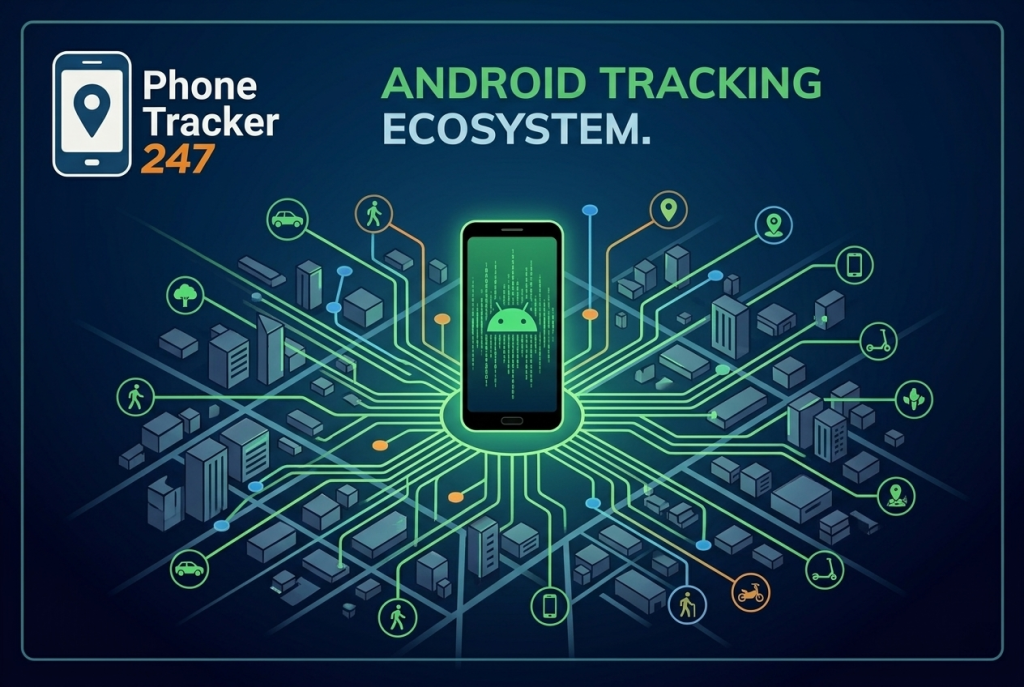
Phone tracker app for Android showing the full Android tracking ecosystem connected across a smart city
One of the most significant shifts in the Android ecosystem is the granularity of control. When you launch a phone tracker app for Android, the OS forces you to make a choice. Do you want the app to see where you are only while you’re looking at it, or do you trust it enough to watch your back while the phone is in your pocket?
Google has also introduced “Privacy Indicators.” If an app—even a legitimate one—accesses your location, a small green icon appears in the top right corner of your screen. This “visual whistleblowing” makes it nearly impossible for a tracker to run in total secrecy. For those of us in the cybersecurity field, this is a welcome change. It prevents “permission creep,” where a simple weather app might start acting as a clandestine device monitoring tool without your knowledge.
Google’s “Find My Device” Network: The 2026 Standard
Google’s upgraded “Find My Device” network is the most powerful native phone tracker app for Android, utilizing a billion-device mesh network. It allows for offline tracking by using encrypted Bluetooth pings from nearby Android devices, ensuring you can find a lost phone even if it lacks a cellular connection.
For years, Apple’s “Find My” was the undisputed king of recovery, but by 2026, Google has closed the gap entirely. The Android “Find My Device” network is now a global web of safety. Because there are billions of active Android devices worldwide, the location tracking accuracy of this system is staggering.
If you leave your Galaxy or Pixel at a remote hiking trailhead, it doesn’t need to reach a satellite. It simply sends out a secure Bluetooth signal that is picked up by the next hiker’s phone. That location is then encrypted and sent to your Google dashboard. At PhoneTracker247.com, we consider this the first line of defense for any user. It is built into the kernel of the OS, making it more resilient than any third-party software you could download.
Phone tracker app for Android with secure and private location tracking protection on Android device
Third-Party Apps: Navigating Background Restrictions
Third-party apps must overcome Android’s “Doze Mode” and “App Standby” features, which are designed to kill background processes to save battery. To maintain a constant connection, a phone tracker app for Android must be manually exempted from battery optimization and granted high-level accessibility or device admin rights.
This is where many users run into trouble. Have you ever noticed that a tracking app seems to “freeze” or stop updating? That isn’t a bug; it’s Android doing its job. The OS is designed to be suspicious of any app that stays “awake” for long periods. To make a third-party device monitoring tool work reliably, you have to dig into the settings and tell the phone, “Yes, I want this app to drain my battery if it means staying connected.”
Legitimate online safety tools will guide you through this setup process. They will ask for “Accessibility Services” or “Display Over Other Apps” permissions. In 2026, Google has made these settings harder to find to protect less tech-savvy users from being tricked into installing malware. However, for a parent or a security-conscious professional, these hurdles are necessary to ensure the tracker remains a persistent safety net.
What Android Blocks: Anti-Stalkerware and Privacy Shields
Android now actively blocks the installation of apps that attempt to hide their icon from the launcher or mask their name in the settings menu. Furthermore, the “Play Protect” system scans for signatures of known stalkerware, automatically disabling apps that exhibit behavior typical of unauthorized surveillance.
hone tracker app for Android providing advanced and accurate real-time Android location data
The days of “invisible” spy apps are effectively over on the Android platform. Google has taken a hard stance against “Stalkerware”—software used to track individuals without their consent. If an app tries to remove its own icon after installation, Android’s “SafetyNet” will flag it as a security threat.
Moreover, Android now sends “Unknown Tracker Alerts.” If a Bluetooth tracking tag (like an AirTag or a Tile) that doesn’t belong to you is moving with you, your Android phone will proactively alert you. This cross-platform collaboration between Google and Apple is a milestone for personal safety. It ensures that the same technology we use for location tracking accuracy isn’t weaponized against us. If you’re interested in how to audit these settings, check out our deep dive on the PhoneTracker247 blog.
Digital Parenting and Safety: Ethical Monitoring
Digital parenting on Android is best achieved through Google Family Link or specialized online safety tools that prioritize transparency. These apps allow for geofencing—setting virtual boundaries that trigger alerts—ensuring that children stay within safe zones without the need for constant, invasive map-watching.
As a cybersecurity expert, I often tell parents that the best tool isn’t an app—it’s a conversation. However, technology provides the framework for that trust. Digital parenting tools on Android have evolved to be less about “spying” and more about “guardrails.”
With geofencing, you can draw a circle around your child’s school or the local park. You don’t need to watch their dot move in real-time; you simply get a notification when they arrive and when they leave. This approach respects the child’s growing need for autonomy while giving the parent peace of mind. Android’s “Screen Time” and “App Limits” further complement this by ensuring that the device itself doesn’t become a distraction or a danger.
Technical Specs: Improving Location Tracking Accuracy
Modern Android phones achieve high location tracking accuracy by “fusing” data from dual-band GPS (L1+L5), Wi-Fi SSID mapping, and Bluetooth beacons. To maximize precision, users should ensure that “Google Location Accuracy” is enabled, which allows the phone to use non-GPS signals to pinpoint coordinates indoors.
GPS is great for open highways, but it’s famously terrible inside a shopping mall or under a thick canopy of trees. To solve this, Android uses “Fused Location Providers.” Your phone “listens” for the unique IDs of nearby Wi-Fi routers and Bluetooth devices. Even if you aren’t connected to them, your phone knows their fixed locations from a global database.
When you use a phone tracker app for Android, this fusion is what keeps the “dot” from jumping across the map. If your accuracy is low, the first thing to check isn’t the app—it’s your “Scanning” settings. Turning on Wi-Fi and Bluetooth scanning (even when you’re not using them for data) provides the high-fidelity signal needed for centimeter-level precision.
Frequently Asked Questions
1. Can an Android phone be tracked if the battery is dead? In 2026, many flagship Android devices (like the Pixel 10 and S26) include “Powered-Off Finding” hardware. This allows a small reserve of power to keep the Bluetooth beacon active for several hours after the phone has “died,” allowing it to be found via the Find My Device network.
2. Does a factory reset remove all tracking apps? Yes, in 99% of cases. A factory reset wipes the user partition where apps live. However, if “Factory Reset Protection” (FRP) is active, the phone will still be locked to your Google account, preventing a thief from using the device even after a wipe.
3. Is it legal to use a phone tracker app for Android on my spouse? In most jurisdictions, tracking an adult without their explicit, informed consent is illegal and classified as stalking. Device monitoring should always be a transparent agreement between parties.
4. Why does my tracking app keep closing in the background? This is likely due to “Battery Optimization.” To fix it, go to Settings > Apps > [Your App] > Battery, and select “Unrestricted.” This tells Android not to put the app to sleep to save power.
5. Can I track an Android phone using just the phone number? Generally, no. Tracking via a phone number is a capability reserved for mobile carriers and law enforcement. Any website claiming to track a phone’s precise location with just a number is likely a scam or a phishing attempt.
6. What is “Geofencing” and how does it work? Geofencing uses your phone’s location to trigger an action when you enter or leave a specific area. It’s a core part of online safety tools, allowing parents to get alerts when their kids reach school safely.
7. How do I know if my own phone is being tracked? Look for the green privacy icon in the status bar, check your “Battery Usage” for apps you don’t recognize, and review your “Location Permissions” in the privacy dashboard to see which apps have accessed your GPS recently. For more tips, visit PhoneTracker247.com.