Before diving into settings, apps or hidden features, it helps to understand why this topic is so sensitive. Learning how to record calls on Android is not just a technical question about buttons or software, it is closely linked to privacy, consent and strict rules in many countries, so you need the legal and ethical context first.
Contents
- 1 1. Why Android Call Recording Is Sensitive And Highly Regulated
- 2 2. Is It Legal To Record Calls On Android In Your Country Or State
- 3 3. How To Record Calls On Android Using Built In Phone Apps
- 4 4. How To Record Calls On Android When Your Phone Has No Native Recorder
- 5 5. Best Practices To Store, Secure And Share Android Call Recordings
- 6 6. Comparison Of Android Call Recording Methods For Different Use Cases
- 7 7. How To Record Calls On Android – Step By Step Checklist
- 8 8. Real World Examples Of Safe Android Call Recording
- 9 FAQ – How To Record Calls On Android Legally And Safely
- 10 10. Sources, Editorial Standards And Legal Disclaimer
- 11 Conclusion – How To Record Calls On Android Safely At A Glance
1. Why Android Call Recording Is Sensitive And Highly Regulated
Before diving into settings, apps or hidden features, it helps to understand why this topic is so sensitive. Learning how to record calls on Android is not just a technical question about buttons or software, it is closely linked to privacy, consent and strict rules in many countries, so you need the legal and ethical context first.
1. Main legitimate reasons people want to record calls on Android
Most people search for how to record calls on Android for very reasonable reasons. You may want a clear record of what a bank, airline or support agent promised on the phone. A salesperson or freelancer might replay calls to improve scripts and closing skills. Someone speaking with a doctor, lawyer or insurance company may record so they do not forget key details later. Parents and caregivers sometimes keep recordings to protect a child or elderly relative, but only when they are honest and respectful about it. Used in this kind of open, documented way, knowing how to record calls on Android can genuinely help you stay organised and protect your interests.
2. How Google and Android phone makers limit call recording features
Technically, Android has become much stricter than it used to be. Older versions allowed many third party apps to hook directly into call audio and record everything. That made it easy to learn how to record calls on Android, but it also made quiet, secret recording far too simple. In response, Google has limited access to the call stream and tightened Play Store rules, and some phone makers now hide or disable built in record buttons in regions with strict privacy laws. The result is that two users with different phones or in different countries can see very different options, even if they follow the same steps.
3. Legal and privacy risks if you record Android calls the wrong way
A single recording can contain names, numbers, login hints and very personal stories. If your phone is lost, hacked or synced to an insecure cloud account, those files can be abused for fraud, blackmail or harassment. In many places, secretly recording a call is itself a crime, especially where all parties must consent. What feels like a simple safety measure can quickly become a complaint, a takedown request or a lawsuit if someone feels tricked. That is why any serious guide on how to record calls on Android starts with risks and responsibilities first, so you can use call recording as a protective tool instead of creating new problems for yourself and others.
2. Is It Legal To Record Calls On Android In Your Country Or State
When people search for how to record calls on Android, they usually expect a quick technical tweak, not a legal lesson. Yet the legal side is the first and most important step. The same action that feels normal in one place can be treated as illegal wiretapping in another. Before you install any app or touch a record button, you need a clear picture of what your local law says about phone conversations, consent and the way recordings may be used later. Only after you understand this background does it make sense to explore how to record calls on Android on any specific device or app.
1. One party consent and all party consent explained
Most of the world follows one of two simple models. In a one party consent system, any person who is part of the conversation can decide to record it. If you are one of the voices on the line, you can usually record calls on Android for your own use, as long as you do not break any other privacy rule. Even then, warning the other side is still the more ethical option. In an all party consent system, everyone on the call has to know about and agree to the recording in advance. Secretly applying any “how to record calls on Android” trick in this second model can turn your attempt to protect yourself into a legal problem.
2. Call recording rules in major regions and markets
Because Android is global, you cannot copy behaviour from a friend in another country and assume it is safe. Some parts of the United States follow one party consent, while several states expect full disclosure from everyone on the call. In much of Europe and the United Kingdom, data protection rules treat call recordings as personal data, which means you need a clear purpose, limited access and strict retention. Other regions mix telecom, criminal and privacy law in different ways, so the same technical guide on how to record calls on Android will not apply equally everywhere. The key lesson is simple: your legal risk depends more on where you are than on which phone model you own.
3. Legal checklist before you record any Android call
Instead of trying to memorise every country, keep a short checklist in mind. Ask whether you are a direct party to the call and whether your area is one party or all party consent. Clarify why you want a recording and how long you really need to keep it. Think about whether you could calmly explain your decision to a regulator, a judge or the other person on the line. If any of these questions makes you uncomfortable, pause your plan for how to record calls on Android and get proper legal advice before you hit record.
Table 1 – High level overview of call recording consent rules
The table below gives a simple, non-exhaustive overview of how call recording consent typically works in different regions. Always double check local law before you decide how to record calls on Android in your own country.
| Region or country | Typical consent model | What this usually means for Android users | Relative legal risk if ignored |
|---|---|---|---|
| United States | Mixed, many one-party | Often allowed if you are on the call, but some states require all parties to agree. | Medium to high |
| EU / EEA | All parties + data rules | Recordings are treated as personal data, with strict limits on purpose, access and retention. | High |
| United Kingdom | Often allowed for personal use, restricted for business | Private recording is usually tolerated, but organisations must follow data protection rules. | High |
| Canada, Australia and similar jurisdictions | Mostly all-party or strong privacy rules | Consent expectations are high and enforcement can be strict. | High |
| Other regions | Varies by country | Local telecom and privacy laws decide what is allowed. | Unknown – always check locally |
3. How To Record Calls On Android Using Built In Phone Apps
If your phone already includes a native call recorder, that is usually the safest place to start. Instead of testing random tools, you can learn How To Record Calls On Android simply by exploring the Phone app that came with your device. Menu names change between brands, but the pattern is the same: switch recording on inside the dialer, follow the legal rules from earlier sections và luôn nhớ mỗi bản ghi là dữ liệu cá nhân nhạy cảm.
1. Turning on call recording in the Google Phone app
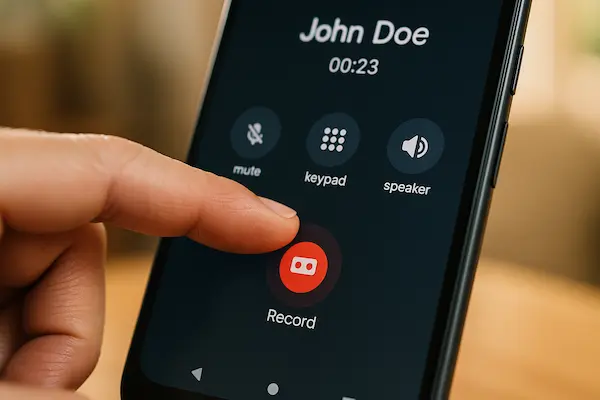
On many recent Android phones that use the Google Phone app, call recording is built directly into the call screen. To check, open the Phone app, tap the three dot menu and look for Call recording in Settings. In supported regions you can enable manual recording so that a small record icon appears during calls. Tapping it starts or stops the recording, and in some countries the app plays a short message so both sides know what is happening. If you cannot see any Call recording menu, your model or region probably does not allow this feature, and forcing it with hacks or modified apps is not a safe way to apply How To Record Calls On Android.
2. Using Samsung and other manufacturer dialers
Many manufacturers still ship their own dialer and offer similar options. On Samsung devices, for example, you open the Phone app, enter Settings and look for Call recording, where you can turn on automatic or manual recording if local rules permit it. Other brands hide the toggle under Call settings or Advanced, but once enabled you usually see a record icon on the in call screen and the system captures audio in the background. This built in route to How To Record Calls On Android is often more stable than third party apps because it is maintained by the same team that ships the dialer and aligned with regional regulations.
3. Finding and managing your Android call recordings
After you have tested How To Record Calls On Android with the native app, learn where the files are stored and how to keep them tidy. Most phones save them either in a Call recordings area inside the Phone app or in a dedicated folder. Play back a short test file to confirm that both sides of the conversation are clear, then rename important clips with the date, contact and topic so you can find them quickly. Finally, treat each recording as private: use a strong screen lock, avoid sharing raw audio in casual chats and regularly delete anything you no longer need.

4. How To Record Calls On Android When Your Phone Has No Native Recorder
On many newer phones the record button is simply gone. Even if you already know How To Record Calls On Android with built in apps, your dialer may offer no option at all. That does not mean you must give up, but it does mean every workaround has extra legal, technical and privacy risk, so you need to choose carefully.
1. When third party call recording apps make sense
Most people in this situation search the Play Store for “call recorder” and install the first app with good reviews. This can work in some regions, but it is not a universal solution to How To Record Calls On Android. Because Google has restricted access to call audio, many apps rely on fragile tricks like using the microphone, accessibility services or rooted features. These may break after an update, record only one side or quietly weaken your security. If you still want to try a third party recorder, pick one with a clear privacy policy, regular updates and transparent pricing, then test it on a harmless call before trusting it with anything sensitive.
2. Using VoIP and business communication platforms
For work calls, the most robust way to apply How To Record Calls On Android often ignores the phone dialer completely. Instead, you place calls through a VoIP app, cloud PBX or business communication platform that records on its own servers. Your Android phone becomes just a client, while the platform handles storage, access control and retention rules. It takes more effort to set up and train people, but you gain consistent quality and tools designed for compliance rather than hacks.
3. Using an external recorder with speakerphone
If you only need recordings occasionally and software options are blocked, a simple external recorder can still help. Put the call on speakerphone and capture the sound with a separate device such as a handheld recorder, another phone or a laptop. This does not modify Android at all, so it works even on heavily locked down devices. It does not change your legal duties: you still need to tell the other person, store the files safely and delete them when they are no longer needed. Used openly, this low tech fallback can be part of a cautious approach to How To Record Calls On Android when native tools are missing.
Once you know How To Record Calls On Android, what you do with the files matters just as much as how you create them. A useful recording can quickly turn into a liability if it is kept too long, stored carelessly or shared in the wrong way.
1. Minimize what you record and how long you keep it
Only record when you have a clear reason, such as documenting an agreement, a complaint or important instructions. If a written note or follow up email would solve the problem, use that instead. When you do record, decide in advance how long you will keep the file and delete it once that purpose is finished. Small, focused archives are easier to protect and easier to explain if someone asks why you kept their voice data.
2. Protect recordings like sensitive personal data
Treat every Android call recording as if it contained passwords and ID numbers, because sometimes it does. Use a strong screen lock, keep your phone updated and avoid leaving files scattered across random folders and apps. Store recordings in one known place, ideally within an encrypted area or a trusted cloud account with two factor authentication. If you are serious about How To Record Calls On Android safely, always assume your phone could be lost or borrowed and plan so that strangers cannot open your recordings.
3. Share recordings rarely and only with a clear purpose
Each time you share a file, you lose some control over it. Before sending a recording, ask whether a short written summary would work instead. If you must share audio, send it only to people with a legitimate reason to hear it, such as a lawyer, manager or regulator, and use private, secure channels rather than public social media or large group chats. You should be able to justify every recording you keep and every copy you share in one or two calm sentences.

6. Comparison Of Android Call Recording Methods For Different Use Cases
There is no single perfect way to apply How To Record Calls On Android. Each method balances convenience, control and legal risk in a different way. A quick comparison helps you match the method to your real goals instead of just copying what other people do with their phones.
1. How to think about risk and complexity
When choosing a method, two questions matter most: how risky it is legally, and how hard it is to manage day to day. A built in recorder usually sits closest to the rules of your region and needs very little setup. Third party apps can add features but rely on workarounds that may break or conflict with platform policies. VoIP and business systems handle recordings on the server, which is more complex to deploy but often better for compliance. External recorders with speakerphone are simple, but they create more files to manage. Any method you use for How To Record Calls On Android should feel predictable enough that you can follow the same safe routine every time.
2. Matching each method to your situation
The right approach depends on who you are. Personal users who only need occasional proof of what was said should favour a built in recorder where it is legally available. Teams handling sales or support are usually better off with a proper VoIP or contact center platform that centralises storage and access rights. Power users in clearly legal regions might consider a trusted third party recorder, but only after reading permissions and privacy policies carefully. External recorders are best kept as an occasional fallback when all software options are blocked and you still want a cautious way to use How To Record Calls On Android for a specific, well defined reason.
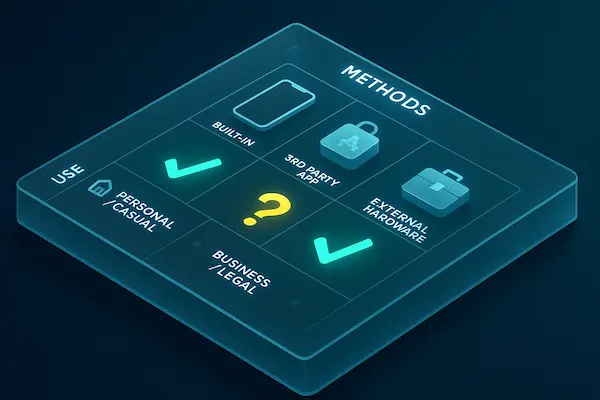
Table 2 – Comparison of Android call recording methods and risk levels
| Method | Technical difficulty | Legal risk (relative) | Best suited for | Key reminder |
|---|---|---|---|---|
| Built in Android call recorder | Low | Medium | Personal users, simple notes | Always check local consent rules |
| VoIP or business call center system | Medium | Medium | Sales, support, operations teams | Needs clear policy and staff training |
| Third party call recording apps | Medium | High | Power users in clearly legal regions | Review permissions and privacy policy |
| External recorder with speakerphone | Low | Medium | Occasional, ad hoc recordings | Be transparent and secure stored files |
7. How To Record Calls On Android – Step By Step Checklist
A lot of people know the theory of How To Record Calls On Android but never turn it into a simple routine. This checklist keeps things practical and easy to repeat.
1. Simple flow for personal Android call recording
- Ask if you really need a recording or if a note or email is enough.
- Check whether your country or state uses one party or all party consent.
- Use the safest method you have – ideally a built in recorder, or a trusted VoIP app if needed.
- Make a short test call to confirm both sides are recorded clearly.
- On the real call, tell the other person you want to record so you do not miss details and ask if they agree.
- After the call, rename the file with date + name + topic, store it in one protected folder and delete it once its purpose is finished.
Follow this same flow every time instead of chasing new “tricks” for How To Record Calls On Android.
2. Extra basics for business and team use
For work, do not let every person invent their own method. Pick one standard platform (usually VoIP or contact centre), write a short policy that covers when you record, how you inform callers and how long you keep files, then train everyone to use the same script and tags. Control access with roles, not casual file sharing, so you can show a clean, consistent process if anyone asks how your organisation records calls.
3. Quick review habit to stay safe
Every few months, quickly review three things: whether local consent rules have changed, whether your apps or platforms are still supported, and whether you are holding any recordings that no longer have a clear purpose. If there is a file you would feel uncomfortable explaining, it is a sign that something in your routine needs to be updated or that the file should be deleted.
8. Real World Examples Of Safe Android Call Recording
Examples make any guide on How To Record Calls On Android easier to apply. These three short stories show how recording can help when it is used openly and thoughtfully – and what to avoid.
1. Sales team using transparent call recording
A small SaaS team wanted better demo calls. Instead of letting each rep install random apps and guess How To Record Calls On Android, the manager deployed one VoIP platform with server side recording and a clear policy.
Every call started with the same line:
“For training and quality, this call may be recorded. Is that OK with you”.
When prospects agreed, the system recorded and tagged calls automatically. Once a week, the team listened to a few clips, turning good calls into examples and weak calls into coaching topics. Because they used one tool, one script and documented consent, their use of Android call recording was easy to explain to customers and auditors.
2. Consumer resolving a billing dispute
A customer stuck in a billing dispute kept hearing different answers from support. After checking that one party consent applied, they enabled the built in recorder and practised How To Record Calls On Android on a test call.
On the real call they said, “I would like to record this so I do not miss any details, is that OK with you”, waited for agreement, then pressed record. They repeated back key dates, amounts and ticket numbers so the facts were clear on the audio. Later, a short excerpt plus a written summary was enough to get the bill corrected without drama.
3. Common mistakes to avoid
By contrast, problems usually come from secret or careless use. People who secretly record friends or colleagues, share clips in group chats or keep years of calls on unlocked phones are not really following any safe version of How To Record Calls On Android.
The safer pattern is simple: have a clear purpose, check local rules, inform the other person, use the most stable method you have and delete recordings once their job is done.
FAQ – How To Record Calls On Android Legally And Safely
1. Is it legal to record calls on Android without telling the other person?
Sometimes yes, sometimes no – it depends on your country or state’s consent rules, so always check local law first.
2. Why does my Android phone not have a call recording option?
Manufacturers and Google often disable call recording in regions with strict privacy rules, so the feature may simply be blocked for your market.
3. What is the safest way to record calls on Android?
Whenever it is available and legal, the safest way to record calls on Android is to use the built in phone app recorder with clear consent from all parties.
4. Are third party call recording apps safe to use?
Some are reputable, but many rely on fragile workarounds, so you should read the privacy policy, check app history and test them on non sensitive calls first.
5. Can Android call recordings be used as evidence?
They sometimes can, but only if they were made legally and are clear, so you should ask a local lawyer before relying on any recording in a serious dispute.
6. How long should I keep my Android call recordings?
Keep recordings only as long as you have a clear, honest purpose for them, then delete them to reduce risk if your phone or account is compromised.
7. How can I keep my Android call recordings secure?
Use a strong screen lock, store files in a single protected folder or encrypted area, and avoid sharing raw audio through public or unsecured apps.
8. What is the simplest checklist for how to record calls on Android safely?
Check local law, inform the other person, use the most stable method you have, store the file securely and delete it once its job is done.
10. Sources, Editorial Standards And Legal Disclaimer
Before you follow any of the steps in this guide, it helps to understand how the information was put together and what its limits are. Because How To Record Calls On Android is a sensitive topic that touches both law and privacy, you should know which sources were used, how the content is checked and where you still need personalised legal advice.
1. Where this Android call recording guide comes from
This guide on How To Record Calls On Android is based on public information about call recording and consent laws in major regions, documentation from Android, Google and device makers, and real practice in sales, support and compliance teams that use recorded calls for training and disputes. The goal is to give you a cautious, real world view rather than just app tips.
2. How the content is checked and maintained
Facts are cross checked against more than one source where possible, and legal context is presented before any “how to” steps. Advice is written to be broadly true across countries, not tied to one jurisdiction only. When updated, priority goes to changes in law, platform policies and manufacturer behaviour that affect how safe it is to record calls on Android.
3. Legal disclaimer
This article is general information, not legal advice. Call recording rules vary sharply between countries, states and situations. Before you rely on any recording in a dispute, investigation or court, you should always check the current law where you live and, if needed, speak to a qualified local lawyer.
Conclusion – How To Record Calls On Android Safely At A Glance
Privacy rules are tightening, Android keeps changing and people still search every day for How To Record Calls On Android without ending up in legal trouble. The real advantage now is not a “secret” app, but a clear framework you can explain to anyone: why you record, how you ask for consent, how you secure the files and when you delete them.
Key takeaways you should keep in mind
If you remember only a few points, let them be these: always check your local consent rules first, use a built in recorder or trusted VoIP platform where possible, and treat every file as sensitive personal data. The moment you cannot calmly justify why you recorded a call and why you still keep that recording, your process is already off track – no matter how clever your How To Record Calls On Android setup looks.
Quick summary table for safe Android call recording
| Step | What you should do | Why it matters |
|---|---|---|
| 1 | Check local call recording and consent rules | Avoid breaking privacy or wiretapping laws |
| 2 | Inform everyone on the call and get consent | Builds trust and keeps you aligned with regulation |
| 3 | Use the safest legal recording method available | Reduces technical failure and hidden security risks |
| 4 | Store recordings in a protected, organised place | Keeps sensitive audio away from casual access |
| 5 | Delete files once their purpose is complete | Limits damage if your phone or account is compromised |
Turn this framework into action with PhoneTracker247
Reading about How To Record Calls On Android is only the first step. To apply it day after day, you need tools that support clear policies instead of random improvisation. PhoneTracker247 gives you a central place to view call history, align monitoring with consent and document why each device is being tracked – especially useful for parents, guardians and organisations that want transparency, not hidden spying.
Review your current habits, compare them against the summary table above, then set up a PhoneTracker247 workflow that fits your legal environment and responsibilities. The sooner you move from ad-hoc recording to a structured, policy driven approach, the safer you and the people you call will be.
For daily updates, subscribe to PhoneTracker’s blog!
We may also be found on Facebook!