You pull up your phone at 4:30 PM and your teenager still isn’t home. You call and get no answer. Before the panic sets in, you open your family location history app, scroll back a few hours, and see exactly where they’ve been. That’s not surveillance. That’s peace of mind, and it’s exactly what this technology was built for.
Whether you’re a parent keeping an eye on a younger child, an adult checking in on an aging parent, or just a family trying to stay connected across busy schedules, a family location history app has become one of those quiet essentials that people can’t imagine living without once they’ve tried it. This guide walks you through how these apps work, what features actually matter, which ones are worth your money in 2026, and how to use them responsibly.
Contents
- 1 What Is a Family Location History App?
- 2 Why Families Need Location History, Not Just Live Tracking
- 3 Key Features to Look for in a Family Location History App
- 4 Top Family Location History Apps in 2026
- 5 How to Set Up Location History on Your Family’s Devices
- 6 Privacy, Consent, and Safety Considerations
- 7 Final Thoughts
What Is a Family Location History App?
Most people already know what real-time location tracking is. You open an app, you see a dot on a map. A family location history app goes a step further by keeping a logged record of everywhere a person has been over a period of time, not just where they are right now.
How Location History Differs from Real-Time Tracking
Real-time tracking is a snapshot. Location history is a story. When you look at a live map, you see one data point representing the current moment. When you review location history, you see an entire timeline: departure times, stops along the way, how long someone lingered somewhere, and the route they took to get home.
This distinction matters more than most people realize. Real-time tracking is useful in the moment, but location history is what helps you understand patterns, reconstruct events, and have calm, informed conversations with your family without having to constantly check your phone throughout the day.

Why Families Need Location History, Not Just Live Tracking
Real-time tracking answers “where are they now?” Location history answers “where have they been?” That second question turns out to be far more useful in most real-world situations.
Reviewing Where Your Child Went After School
Kids don’t always go straight home, and that’s not a sign of bad parenting. When your 12-year-old arrives home an hour late and gives a vague answer about “hanging out,” pulling up a location timeline changes the whole dynamic. You’re not accusing anyone. You’re just looking at the facts together, which most of the time turn out to be completely innocent.
This kind of calm, evidence-based conversation is one of the most underrated benefits of this type of app. It takes the emotion out of confrontation and replaces it with something concrete.
Verifying a Teen’s Route After an Incident
When something goes wrong, whether it’s a fender-bender, a sketchy situation, or a phone that stops responding, location history becomes invaluable. You can see the last known position, track the route taken, and figure out whether your teen diverted somewhere unexpected. These apps aren’t just about everyday peace of mind. They can genuinely matter when things go sideways.
Checking on Elderly Parents with Memory Conditions
Families caring for aging parents, especially those with early-stage dementia or Alzheimer’s, face a different kind of worry. An elderly parent might leave the house and not remember how to get back. Location history lets caregivers reconstruct what happened and identify patterns before a crisis occurs. Many families report that having this safety net reduced their anxiety significantly, even on the days they never needed to check it.

Key Features to Look for in a Family Location History App
Not all tracking apps are created equal. Before you download anything, it’s worth knowing which features actually deliver value.
History Duration and Display Options
This is the first question to ask. A free app might show the last 24 hours, a mid-tier subscription might give you 7 days, and premium plans can stretch to 30 days or beyond. For most families, 7 days is a practical sweet spot as it covers the full school week and gives you enough data to spot patterns without information overload.
Beyond duration, look for apps that offer both a timeline view and map playback. Timelines are faster for answering specific questions like what time did she leave school, while map playback is better for understanding the full context of a journey. The best family location history apps give you both.
Place Detection and Privacy Controls
The best apps don’t just log coordinates. They recognize meaningful places like home, school, and work, and send alerts when a family member arrives or leaves. This saves you from decoding raw data and is especially useful for parents of younger kids who just want a notification that their child made it somewhere safely.
On the privacy side, look for end-to-end encryption, clear data retention policies, and the ability to delete history on demand. In 2026, reputable family location history apps are also compliant with COPPA and GDPR. If an app is vague about how it stores or shares your data, that’s a red flag.
Table 2: What to Look for in a Family Location History App
| Feature | Why It Matters | Ideal Standard | Best For |
|---|---|---|---|
| History Duration | Helps parents review trips, routines, and missed check-ins | At least 7 days, ideally 30 days | Families wanting weekly or monthly pattern tracking |
| Timeline + Map Playback | Makes it easier to answer both “when?” and “where?” | Both views available in one dashboard | Parents reviewing school runs, errands, or detours |
| Place Alerts / Geofencing | Sends notifications when someone arrives or leaves a place | Custom alerts for home, school, and work | Parents of younger children |
| Precise Timestamps | Helps reconstruct events after delays or incidents | Accurate stop times and route records | Teen safety, elderly care, incident review |
| Privacy Controls | Protects sensitive family location data | Encryption, clear retention policy, delete-on-demand | Privacy-conscious households |
| Cross-Platform Support | Keeps tracking reliable across Android and iPhone devices | Smooth sync on both systems | Mixed-device families |
| Battery Optimization | Prevents location history gaps in the background | Stable background tracking with low battery drain | Daily use across multiple devices |
| Consent and Transparency | Encourages ethical and responsible tracking | Clear family rules and visible opt-in use | Families building trust, not secret surveillance |
Top Family Location History Apps in 2026
The market has matured a lot over the past few years. Here are the family locator apps that consistently stand out.
1. PhoneTracker247: The Professional-Grade Tracker
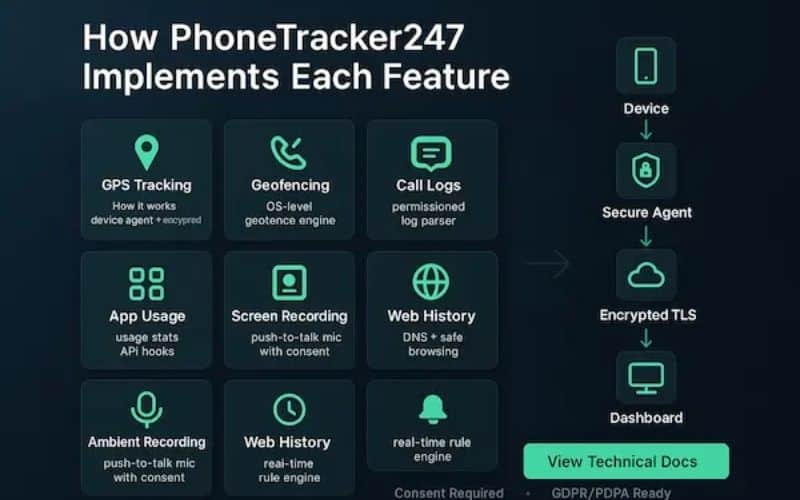
PhoneTracker247 has established itself in 2026 as the go-to solution for users who prioritize deep data and reliability over social features. It bridges the gap between basic location sharing and professional monitoring.
- Detailed Review: This app excels in “high-frequency” tracking. While other apps might update every few minutes to save battery, PhoneTracker247 offers near-continuous GPS pings, creating a seamless breadcrumb trail on the map. Its 30-day history is incredibly detailed, showing not just where a person stopped, but the exact route they took to get there.
- Pros:
- Extremely accurate location history with precise timestamps.
- Works discreetly with a highly stable background connection.
- Web-based dashboard allows for monitoring from any device.
- Cons:
- The interface is more utility-focused and lacks “fun” social features like emojis.
- Setup on iOS can be more technical than on Android.
- Price: Approximately $19.99/month for a basic plan; Premium plans for multiple devices range around $39.99/month.
2. Life360: The All-in-One Safety Suite
Life360 remains the market leader by bundling location history with comprehensive family safety services.
- Detailed Review: Life360 is built around “Circles,” allowing you to organize different groups. In 2026, its crash detection and emergency dispatch features are its biggest selling points. The app doesn’t just show history; it provides a “Driver Report” that analyzes phone usage, speed, and braking habits during those trips.
- Pros:
- Robust “Place Alerts” (notifications when someone arrives/leaves).
- Includes roadside assistance and emergency SOS on higher tiers.
- Excellent for families with teenage drivers.
- Cons:
- Known for high battery consumption due to constant background activity.
- The free version is very limited (only 2 days of history).
- Price:
- Free: 2 days of history.
- Gold: ~$29.99/month (30 days of history + crash detection).
- Platinum: ~$39.99/month (Includes disaster response and identity theft protection).
3. Google Family Link: The Best Free Android Utility
For families deeply integrated into the Google ecosystem, Family Link is a powerful, no-cost entry point.
- Detailed Review: This isn’t just a location app; it’s a full parental control suite. It leverages Google Maps’ infrastructure to show where children are. While it’s great for seeing a child’s current status, the historical data is less of a “timeline” and more of a series of check-ins.
- Pros:
- Completely free with no ads.
- Allows parents to lock devices or set app time limits remotely.
- Seamless integration with Android devices.
- Cons:
- Limited historical depth compared to paid competitors.
- Lacks advanced features like driving analytics or crash detection.
- Price: Free.
4. Apple Find My: Seamless and Private
For “all-iPhone” households, Apple’s native solution offers the best privacy and system-level stability.
- Detailed Review: “Find My” uses Apple’s massive network of devices to locate a phone even if it’s offline. It is built on privacy—location data is end-to-end encrypted. However, it is designed for “current location” rather than “historical review.” You won’t find a 30-day list of every street someone drove down.
- Pros:
- Zero impact on battery life compared to third-party apps.
- Highest level of data privacy in the industry.
- Works even if the tracked device has no cellular signal (via the Find My network).
- Cons:
- No long-term history logs (only current or last known location).
- Locked strictly to Apple hardware.
- Price: Free (Included with Apple devices).
5. Bark: The AI-Powered Guardian
Bark is designed for parents who want to stay informed about “danger” rather than watching a dot move on a map all day.
- Detailed Review: Bark app uses AI to monitor location patterns. Instead of showing you every stop at a grocery store, it alerts you if your child goes to a “risk area” or is in an unexpected location at 2:00 AM. It combines this with powerful social media and text monitoring.
- Pros:
- Reduces “micromanagement” by only alerting parents to anomalies.
- Monitors 30+ social media platforms for cyberbullying or predatory behavior.
- Focuses on the context of the location, not just the coordinates.
- Cons:
- Not ideal if you want to see a minute-by-minute historical route.
- Price:
- Bark Jr: ~$5/month (Location and screen time only).
- Bark Premium: ~$14/month (Full AI monitoring suite).

6. FamiSafe (Wondershare): The Cross-Platform Specialist
FamiSafe is a reliable middle-ground for families that mix Androids and iPhones.
- Detailed Review: FamiSafe provides a very clean “Timeline” view. It categorizes location history by date and time, making it easy to see exactly how much time was spent at specific coordinates. It also includes “Geofencing,” which lets you draw virtual borders on a map and receive alerts when they are crossed.
- Pros:
- Excellent geofencing reliability.
- Includes features like “Suspicious Photo Detection” on the child’s device.
- Very user-friendly interface for non-tech-savvy parents.
- Cons:
- The sync between parent and child apps can occasionally lag.
- Price: Approximately $19.99/month or a discounted annual plan at $59.99/year.
How to Set Up Location History on Your Family’s Devices
Getting a family location history app set up is straightforward and takes under 10 minutes on most apps. The key step that people miss on iPhone is setting location permission to “Always Allow” rather than “While Using,” since history logging won’t work in the background otherwise. Confirm this under Settings, then Privacy and Security, then Location Services.
On Android, the step most people skip is disabling battery optimization for the app. Android’s power management tends to interrupt background location logging, which is the most common reason history shows up patchy or incomplete. Go to Settings, find the app under Apps, tap Battery, and set it to “Unrestricted.” That one change fixes most issues. After that, send family invites from within the app, have each member accept on their own device, and you’re done.
Privacy, Consent, and Safety Considerations
A family location history app is a powerful tool, and the way you use it matters just as much as what it can do.
Should You Tell Your Kids You’re Tracking Them?
Yes, and not just for ethical reasons but practical ones. Research consistently shows that teens who know they’re being monitored and understand why are more likely to make safer choices than those who feel secretly watched. Frame it as a safety tool, not a punishment. Many families find their teenagers actually feel reassured knowing someone can find them quickly if something goes wrong.
Before committing to any app, read the privacy policy carefully, especially the parts about data retention and third-party sharing. Some apps have faced scrutiny in the past for selling anonymized location data. In 2026, transparency about data use is a baseline expectation, and any app that can’t meet it isn’t worth the risk.
Final Thoughts
A good family location history app doesn’t make you a helicopter parent. It gives you the context to be a calmer, more confident one. The best outcomes happen when families use these tools openly, with agreed-upon boundaries, rather than treating them as covert monitoring systems. Start with what your family actually needs, and let the conversation about why you’re using it matter as much as the app itself.