Instagram can feel like a crowded digital city. Your teen walks through it every day, meeting friends, finding trends, and sometimes stepping into spaces that move faster than judgment. That is why learning how to set up Instagram parental controls matters. With the right setup, we can reduce exposure to unwanted contact, limit screen time, and make privacy settings stronger from the start. Instagram now offers built-in tools through Teen Accounts, Family Center, and supervision, but those tools work best when we configure them carefully and pair them with ongoing guidance at home. Let PhoneTracker247 help you understand this more clearly in the article below.
What Instagram parental controls actually include
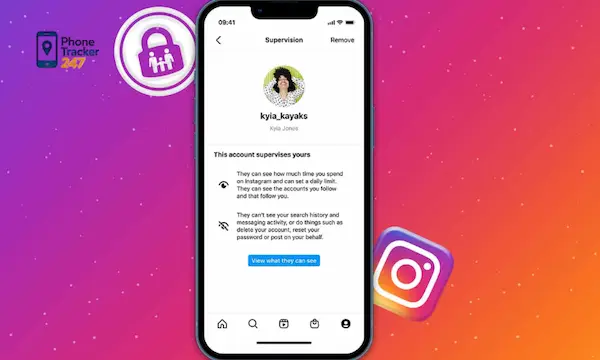
Before we begin the setup, it helps to know what these controls can do. Instagram parental controls are centered on Family Center and supervision. Once linked, a parent or guardian can review time spent on Instagram, set time limits, see follower and following lists, check recent message contacts, and help manage certain teen safety settings. Parents do not get access to private message content through these built-in tools.
That distinction is important. Instagram is giving parents visibility into patterns and settings, not full message surveillance. In practice, that means we can use the platform’s own controls to guide safer habits, while still respecting some boundaries around personal communication.
What to know before you start setup
Instagram supervision has eligibility rules. The teen must generally be 13 to 17 years old, the parent must be 18 or older, and only one parent or guardian can supervise a teen account at a time. The setup also requires both people to have Instagram accounts, and the teen must accept the invitation to activate supervision.
It also helps to understand the current Instagram environment for minors. Instagram’s Teen Accounts come with protective defaults, including private account settings and stricter controls for younger teens. Teens under 16 need parental permission to make certain protections less restrictive. That means the setup is not only about linking accounts. It is also about deciding which protections we want to keep firmly in place.
How to set up Instagram parental controls step by step
This is the core process most parents are looking for. The path is fairly simple once both accounts are ready.
1. Update both Instagram accounts
Start by making sure both the parent’s and teen’s Instagram apps are updated to the latest version. This reduces the chance of missing menu options or outdated supervision prompts. If one account is behind, the Family Center workflow may not display correctly.
2. Open Family Center or Supervision in the parent account
In the parent’s Instagram app, tap the profile icon, then tap the three-line menu in the upper corner. From there, open Settings, then look for Family Center or Supervision. Instagram’s Help Center describes Family Center as the place where parents can view supervised accounts and manage supervision settings.
See more: How to Number track Number Safely and Legally
3. Create and send the supervision invite
Inside Family Center, choose the option to get started and create an invite. Instagram will generate a supervision invitation that can be shared with your teen. Send it directly so the teen can open it from their own account and review the request.
This step matters because supervision is not imposed silently. Instagram requires the teen to accept the connection, which fits the platform’s consent-based approach to family supervision.
4. Have your teen accept the invitation
On the teen’s account, they need to open the invitation and approve supervision. Once accepted, the accounts are linked through Family Center. After that, the parent can begin reviewing activity summaries and adjusting supported settings.
5. Review the supervision dashboard
After the connection is active, go back into Family Center and review what is available. At this stage, we should confirm time management tools, account visibility options, and any setting approval controls available for the teen’s account. That turns supervision from a one-time setup into an ongoing safety routine.
Essential Instagram safety settings to turn on next
Setting up supervision is only the first layer. The stronger protection comes from reviewing the account settings that shape daily use.
Make sure the teen account stays private
Teen Accounts are designed with private defaults, and that is one of the most important protections to keep. A private account limits who can follow the teen and who can view shared content. For many parents, this single setting reduces risk more than any other step because it narrows the audience from the start.
Set daily time limits
Time limits help us move beyond vague conversations about “using Instagram less.” With supervision enabled, parents can view time spent and set limits that fit school days, weekends, or family routines. This is useful because healthy social media use is rarely about banning an app entirely. It is usually about creating consistent boundaries.
Brief introduction for the checklist below: these are the time-control actions that should be prioritized.:
- Set a realistic daily limit based on age and school schedule
- Review usage after the first week and adjust if needed
- Use breaks or quiet periods around homework and bedtime
- Explain the reason behind each limit so the rule feels consistent, not random

Keep sensitive content protections strong
Instagram applies more restrictive content settings to teens. These settings help reduce exposure to sensitive or potentially inappropriate recommendations across parts of the platform. For younger teens, parental approval may be required to reduce those protections. That makes this setting less about convenience and more about maintaining a safer discovery experience.
Review messaging and contact safety
Instagram has also added restrictions around teen contact and message safety. Supervision does not let parents read private DMs, but it does let them see recent message contacts. That gives us a way to monitor patterns without treating every chat like a disciplinary issue. It is often enough to spot unfamiliar contact behavior early and open a conversation at the right time.
See more: What Is a Sim Card Tracker App? Simple and Accurate Ways to Track a SIM
What parents can and cannot see
This is where many families get confused, so it needs to be clear. With Instagram supervision, parents can see:
- Time spent on Instagram
- Followers and following lists
- Recent accounts the teen messaged
- Certain safety setting information and approvals for eligible teen accounts
Parents cannot see:
- The content of private direct messages
- A complete picture of activity outside Instagram
- Device-level behavior across apps, browser use, or broader phone usage through Instagram alone
That limitation is not a flaw so much as a design boundary. Instagram built these controls for in-app supervision, not full device monitoring.
When Instagram’s built-in controls may not be enough
For some families, Instagram’s tools cover the basics well. For others, they leave important blind spots. If we need a broader view of screen habits, app activity, or web behavior beyond one platform, then in-app supervision is only one part of the solution.
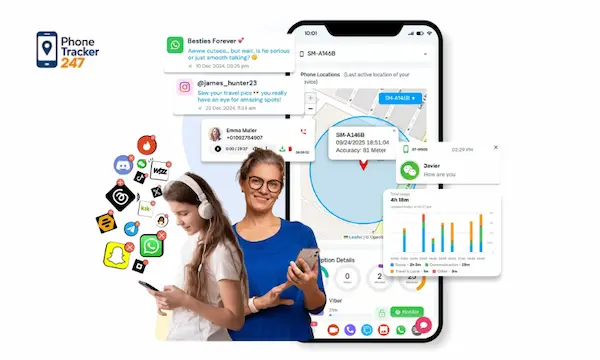
This is where our approach with PhoneTracker247 becomes useful. We position PhoneTracker247 as a parental control and phone monitoring platform that helps families manage device activity from a centralized dashboard. Depending on the plan and supported environment, our platform can extend visibility beyond Instagram into app usage, browsing history, location-related features, and broader device activity, while emphasizing lawful use, consent, and transparency.
That matters because real parenting decisions rarely happen app by app. We often need the wider context. If a teen’s Instagram time looks fine but overall device use spikes late at night, or if risky behavior shifts to another app, built-in Instagram controls will not show the whole pattern. A broader parental control workflow can.
Best practices for using Instagram parental controls well
The strongest setup combines tools with clear communication. Controls work best when teens understand the purpose behind them and know that safety is the goal.
Brief introduction to the implementation principles below:
- Tell your teen what supervision covers before enabling it
- Review settings together instead of changing everything silently
- Revisit limits after school breaks, holidays, or routine changes
- Use message-contact visibility as a conversation starter, not automatic punishment
- Pair Instagram supervision with device-level controls when your family needs a wider view
This kind of transparent setup aligns well with how we think about digital safety at PhoneTracker247. Monitoring should support protection and accountability, not secrecy.
Conclusion
Learning how to set up Instagram parental controls is one of the simplest ways to make a teen’s account safer without overcomplicating the process. With Teen Accounts, Family Center, and supervision, we can strengthen privacy, set time limits, and keep a clearer view of follower activity and recent contacts. But Instagram’s tools are still platform-specific. If your family needs broader visibility across apps and devices, combining Instagram’s built-in protections with PhoneTracker247 can create a more complete, practical safety system. Explore our monitoring workflow, set clear boundaries, and build a safer digital routine that your family can actually maintain.
For daily updates, subscribe to PhoneTracker’s blog!
We may also be found on Facebook!
FAQs – Instagram Parental Controls
1. How do I set up Instagram parental controls?
Use Family Center and send a supervision invite.
2. Do parents need an Instagram account?
Yes, both parent and teen need Instagram accounts.
3. Can parents see Instagram messages?
No, parents cannot read private DMs.
4. What can parents see on Instagram?
They can see time spent, followers, following, and recent message contacts.
5. Can I set Instagram time limits?
Yes, parents can set daily time limits.
6. Can I keep my teen’s account private?
Yes, private account settings should stay enabled.
7. Can Instagram block sensitive content?
Yes, teen accounts have stronger content protections.
8. Does my teen need to accept supervision?
Yes, supervision starts only after teen approval.
9. Are Instagram controls enough?
They help, but they only cover Instagram.
10. What is the safest first step?
Link Family Center and review privacy settings.