The term iPhone key logger continues to trend in 2026 as people look for ways to monitor typing activity on iOS devices. Parents worry about online safety, employers care about data security, and individuals want transparency on devices they own. But does an iPhone key logger actually work the way people expect? Instead of invasive tools, focus on safer monitoring features like screen-time limits, content filters, and location sharing with consent.
This guide explains the reality behind iPhone keyloggers, Apple’s security limits, legal concerns, and the safest alternatives that actually work on modern iPhones.
What Is an iPhone Key Logger?
An iPhone key logger is commonly described as software that records everything typed on an iPhone, including messages, passwords, and search queries. Many people assume it works the same way as keyloggers on Android devices or Windows, but iOS is very different.
In practice, the idea of an iPhone key logger is often misunderstood due to Apple’s strict system architecture and privacy protections.
Definition of an iPhone Key Logger
An iPhone key logger is theoretically a tool designed to capture keystrokes entered on an iOS device. On desktop systems, keyloggers work by intercepting keyboard input at the system level.
On iPhones, however, Apple prevents third-party apps from accessing system-wide keystroke data. This means most advertised iPhone key logger tools do not function as claimed.
What Can an iPhone Key Logger Record?
In real-world conditions, an iPhone key logger cannot directly record keystrokes across apps on a non-jailbroken device. Apple isolates app data using sandboxing, which blocks this behavior.
Some tools claim to capture typed content indirectly using screen monitoring or synced cloud data. While this is not true keystroke logging, it explains why the term iPhone key logger is still widely searched.
Table: Legal iPhone Monitoring Options (2026)
| Solution | Best for | Setup model (iPhone) | What you can monitor (high-level) | What you can’t do (important) | Compliance note |
|---|---|---|---|---|---|
| PhoneTracker247 | Parents who want clear, simple oversight | iOS-permission / account-based monitoring (no jailbreak) | Activity insights, safety-focused reporting, device/location signals (where supported) | No true system-wide keystroke logging on modern iOS without jailbreak | Use only with lawful authority (parent/guardian or owned device) |
| mSpy | Broader visibility via synced data | iCloud/sync-based access (common approach) | Synced messages/content signals, call logs, browsing activity (depends on sync) | Not a “typed keystrokes” keylogger on non-jailbroken iPhone | Use consent/authority; protect iCloud with 2FA |
| Qustodio | Screen-time limits + family controls | Parental control framework + iOS limits | Screen time, web filtering, usage reports (iOS-limited) | Not full message/keystroke capture | Best when combined with clear family rules |
| Bark | Risk detection + safety alerts | Alert-driven monitoring within allowed frameworks | Alerts for risky content signals (bullying/self-harm/explicit content indicators) | Not full logs of everything typed | Prioritizes safety alerts over raw surveillance |
Why People Search for iPhone Key Loggers
People searching for an iPhone key logger are usually not looking for hacking tools. Most are searching for visibility, protection, or reassurance related to device usage.
Understanding this intent is critical for separating myths from practical, legal solutions.
Parental Monitoring Needs
Parents often search for iPhone key logger solutions to understand what their children are typing online. They worry about exposure to cyberbullying, explicit content, or online predators.
Rather than spying, most parents want awareness and early intervention. This intent is better served by monitoring tools designed specifically for family safety.
Relationship Trust & Transparency Concerns
Some users search for an iPhone key logger due to concerns about honesty or transparency in relationships. They may suspect hidden conversations or inappropriate communication.
While emotions drive these searches, installing spying software without consent can lead to serious legal and ethical problems. Transparency and device ownership matter greatly in these situations.
Business & Device Security Reasons
Companies issuing iPhones to employees want to prevent data leaks and unauthorized communication. Searching for an iPhone key logger often reflects concern over intellectual property security.
In professional environments, lawful monitoring solutions exist that comply with employment and data protection laws.
Do iPhone Key Loggers Actually Work?
This is the most important question users ask when researching an iPhone key logger. The short answer is: not in the way most people expect.
Apple’s iOS security model prevents traditional keylogging methods entirely.
iOS Security Restrictions Explained
Apple uses a closed operating system where apps are sandboxed from one another. This prevents any app from recording keystrokes typed in other apps.
System-level access is restricted even from Apple itself, which is why an iPhone key logger cannot function like a Windows keylogger. These protections have only become stronger in iOS versions released up to 2026.
Jailbreak vs Non-Jailbreak iPhones
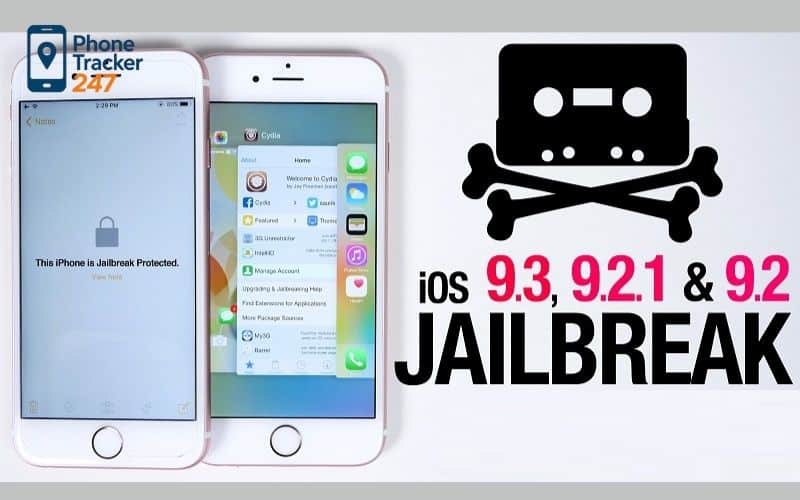
Jailbreaking removes Apple’s restrictions and theoretically allows deeper access to the device. Some so-called iOS keylogger tools only work on jailbroken phones.
However, jailbreaking exposes the device to malware, voids warranties, breaks updates, and creates security vulnerabilities. For most users, this approach is risky and not recommended.
Is It Legal to Use an iPhone Key Logger?
Legality is one of the most misunderstood aspects of using an iPhone key logger. Many users assume personal reasons justify monitoring, but the law often disagrees.
In most countries, consent and ownership determine legality.
Legal Use Cases
Using monitoring software on a device you own and control is generally legal. Parents monitoring minor children’s devices usually fall under this category.
Businesses may monitor company-owned iPhones with clear employee consent and documented policies. Transparency is essential in all legal use cases.
Illegal and Risky Scenarios
Installing an iPhone key logger on someone else’s device without permission is illegal in many jurisdictions. This can violate wiretapping, privacy, and data protection laws.
Consequences may include lawsuits, fines, or criminal charges. This is why reputable companies avoid promoting keylogging features.
Safe & Legal Alternatives to iPhone Key Loggers
Because a true iPhone key logger does not work reliably, modern monitoring relies on indirect but effective methods. These approaches are legal, safer, and compatible with iOS. Most users searching for keyloggers actually want outcomes, not keystrokes.
A more transparent option is browsing history and app activity tracking, which focuses on safety signals without capturing keystrokes.
iPhone Monitoring Apps (Without Keylogging)
A legitimate iPhone monitoring app tracks activity rather than keystrokes. This includes messages, app usage, browsing history, and screen activity.
These tools rely on cloud synchronization and permissions instead of system interception. As a result, they remain stable across iOS updates.
Screen Recording & Screen Monitoring Features
Screen monitoring captures what appears on the device rather than what is typed internally. This provides context and clarity without violating system security.
For parents and businesses, screen-based monitoring often delivers better insight than raw keystroke data.
Table: iPhone Keylogger Alternatives (2026)
| Category | Example approach | Typical goal | Risk level | Legal/ethical status (general) | Recommended alternative |
|---|---|---|---|---|---|
| True keylogging (spyware) | Jailbreak tweaks, “hidden keylogger” installs | Capture every keystroke | Very high | Often illegal without explicit authority/consent; high abuse potential | Avoid. Use parental control / safety tools instead |
| Credential-based “monitoring” | Using someone’s iCloud login to view synced data | Read synced messages/data | High | Illegal if unauthorized; also account takeover risk | Enable 2FA, change passwords, use official family tools |
| Parental controls (first-party) | Apple Screen Time, Family Sharing | Limits + reports | Low | Typically legal for guardians on minors / owned devices | Use as baseline; combine with safety routines |
| Legal monitoring apps (third-party) | PhoneTracker247, Qustodio, Bark, etc. | Oversight + alerts + reporting | Low–Medium | Generally acceptable when used with consent/authority | Choose reputable vendors; minimize data collection |
| Workplace device management | MDM on company-owned iPhones | Policy enforcement + security | Medium | Usually allowed with policy + notice | Use written policy, banner notice, least-privilege monitoring |
| Security & anti-malware hygiene | Updates, app permission audits, 2FA | Prevent spying | Low | Always recommended | Keep iOS updated; remove unknown profiles; review keyboards & permissions |
How to Monitor iPhone Activity Without a Key Logger
Monitoring an iPhone in 2026 is more about configuration than installation. Apple’s ecosystem supports controlled access when set up correctly.
This approach delivers long-term reliability.
Using iCloud-Based Monitoring
iCloud synchronization allows access to messages, activity logs, and backups depending on permissions. This method is widely used by monitoring platforms.
It avoids malware risks and remains functional even after iOS updates, unlike fake iPhone key logger tools.
Step-by-Step Setup Overview
Monitoring typically involves creating an account, connecting the iPhone via Apple credentials, and selecting data categories. No physical access is required after initial setup.
Once connected, activity can be viewed through a secure web dashboard.
Risks of Using Fake or Illegal iPhone Key Loggers
Many websites advertise free or hidden iPhone key logger downloads. These tools pose serious risks to users and devices.
Understanding these dangers can prevent costly mistakes.
Malware and Data Theft Risks
Fake keyloggers often install spyware that steals Apple IDs, passwords, and financial data. Instead of monitoring others, users end up compromising themselves.
Infected devices may suffer performance issues or permanent account loss.
Account Bans and Legal Consequences
Apple actively detects suspicious activity. Using illegal iPhone key logger software can result in Apple ID suspension or device bans.
Legal consequences may follow if privacy violations are reported.
Top 3 iPhone Monitoring Apps (Smart Alternatives to Traditional Keyloggers)
Due to Apple’s strict iOS security architecture, a traditional iPhone key logger that records system-level keystrokes does not exist without jailbreaking. However, several well-known monitoring apps are frequently mentioned in connection with iPhone key logger searches because they provide indirect visibility into typed content, such as messages, activity logs, and screen-based insights.
Below are three of the most widely recognized options in 2026.
mSpy – Advanced Activity Monitoring for iPhone
mSpy is one of the most commonly referenced tools when users search for an iPhone key logger. While it does not capture system-level keystrokes on non-jailbroken devices, it offers detailed visibility into typed content through synced data and activity logs.
On iPhone, mSpy can monitor messages, call logs, browsing activity, and app usage using iCloud-based access. For users who jailbreak their devices, additional deep monitoring features may become available, though this comes with higher security risks.
Qustodio – Parental Monitoring Instead of Keylogging
Qustodio is not a keylogger in the technical sense, but it is frequently considered an alternative by users searching for iPhone key logger solutions. Its strength lies in structured parental control rather than covert monitoring.
The app focuses on screen time tracking, message visibility, web filtering, and activity reports. For parents, this approach provides clarity and safety without violating iOS restrictions or privacy laws.
Bark – Content Analysis and Smart Alerts
Bark takes a different approach compared to tools often labeled as iPhone key loggers. Instead of logging keystrokes, it analyzes messages, emails, and social media interactions for risky or harmful content.
Using AI-driven alerts, Bark notifies parents when it detects signs of cyberbullying, self-harm, or inappropriate communication. On iOS, Bark operates within Apple’s allowed frameworks, making it a safer long-term solution for content awareness.
See more: Best Keystroke Recorder Tools in 2026: Secure Monitoring for PC and Mobile
FAQs – iPhone Key logger
1) Can you install a keylogger on iPhone without jailbreak?
Usually no. iOS blocks true system-wide keystroke logging.
2) Is iPhone keylogging legal?
Only with lawful authority/consent (laws vary by location).
3) Are “free iPhone keylogger” apps safe?
Mostly no—many are scams or spyware.
4) Best legal alternative to an iPhone keylogger?
Apple Screen Time + a reputable parental control app.
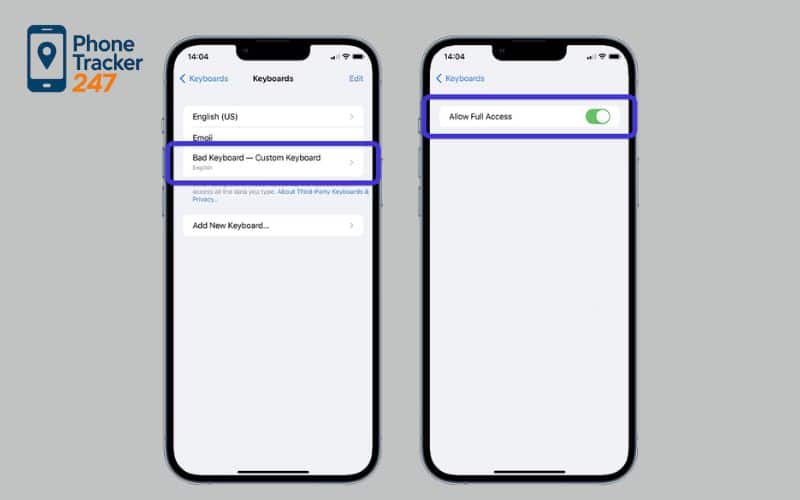
5) Can a keyboard app steal what I type?
It can see input inside that keyboard, not the whole iPhone.
6) Is iCloud monitoring the same as keylogging?
No—it’s sync data access, not keystrokes.
7) Signs your iPhone is being monitored?
Unknown profiles/MDM, strange Apple ID alerts, new keyboards.
8) First thing to check for spyware on iPhone?
Settings → VPN & Device Management (remove unknown profiles).
9) Fastest way to secure your iPhone?
Change Apple ID password, turn on 2FA, update iOS.
10) Safest lawful monitoring in 2026?
Use transparent, consent-based parental monitoring—not hidden spying.
Final Verdict: Should You Use an iPhone Key Logger?
The idea of an iPhone key logger remains popular, but the technology does not work on modern iOS devices. Apple’s security model makes traditional keylogging impossible without extreme risk.
In 2026, the smartest approach is using legal monitoring alternatives that deliver results without violating privacy or security. If your goal is visibility, protection, or accountability, modern monitoring apps are far more effective than chasing outdated keylogger myths.
Quick Summary Table: What to Do Instead of an “iPhone Keylogger”
| Your goal | Why a keylogger is the wrong tool on iPhone | Safer legal alternative (works with iOS) | Best first step today |
|---|---|---|---|
| Protect a child from risky chats, predators, or cyberbullying | “True” keystrokes aren’t reliably available on modern iOS | Screen Time + a reputable monitoring app with alerts & reports | Set Screen Time rules, then add a consent-based safety dashboard |
| Secure a company iPhone (data leaks, policy violations) | Hidden logging creates legal & HR exposure | MDM + written policy + least-privilege monitoring | Publish a monitoring notice + enforce app/permission controls |
| Regain clarity on a device you own/manage | “Free keylogger” offers often hide scams/spyware | Account-based monitoring + security hygiene | Turn on 2FA, review profiles/MDM, remove unknown keyboards |
| Reduce uncertainty without breaking trust | Secret spying escalates conflict and legal risk | Transparent family rules + safety check-ins | Agree on boundaries: what’s monitored, why, and for how long |
Ready to Monitor the Right Way? Start With PhoneTracker247
If you want real visibility without jailbreak headaches or sketchy downloads, PhoneTracker247 is built for the reality of modern iPhone monitoring: permission-based setup, safety-focused reporting, and practical oversight that doesn’t pretend to be a system keylogger.
Start now (recommended setup):
-
Create your PhoneTracker247 account
-
Connect the iPhone using the guided, iOS-friendly method
-
Turn on the reports and alerts you actually need (keep it minimal)
-
Set clear rules: who’s monitored, why, and what “success” looks like
Click Get Started Free and build a monitoring setup that’s legal, stable through iOS updates, and designed for real-world safety, not spyware myths.