In most homes, classrooms and workplaces, people jump between phones, tablets and laptops while risks quietly follow them from screen to screen. Unified device tracking replaces that patchwork of separate apps with one coherent view, so adults can see important patterns earlier instead of reacting after something has gone wrong. Done well, it focuses on meaningful signals, clear rules and honest communication, not spying on every tap and click.
Contents
- 1 1. What Is Unified Device Tracking And Why It Matters
- 2 2. How Unified Device Tracking Software Works Behind The Scenes
- 3 3. Unified Device Tracking For Digital Safety – Families, Schools, Businesses
- 4 4. Privacy, Consent And Ethics In Unified Device Tracking
- 5 5. How To Evaluate Unified Device Tracking Software Vendors
- 6 6. Implementation Roadmap – From Pilot To Full Rollout
- 7 7. Latest Trends Shaping Unified Device Tracking And Digital Safety
- 8 8. Case Studies – Unified Device Tracking In Action
- 9 FAQs – Unified Device Tracking For Digital Safety
- 10 Conclusion And Next Steps
1. What Is Unified Device Tracking And Why It Matters
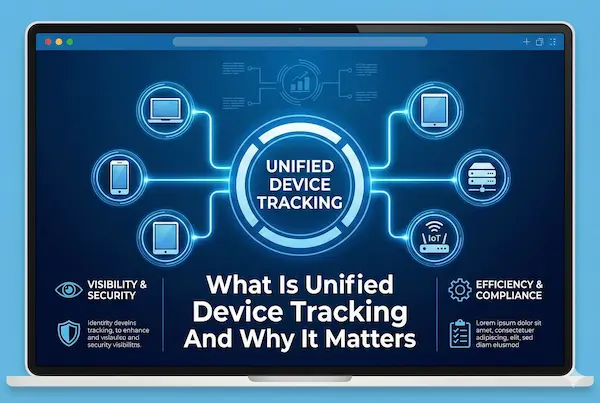
Most safety tools were built for a time when one person meant one device. That is no longer true. Kids, students and employees jump between multiple screens all day, so any serious approach to digital safety has to see the whole picture, not just one phone or laptop at a time. This section explains what that shift looks like and why it matters for the way families, schools and businesses protect people online.
1. Defining unified device tracking in today’s digital life
Most people use a mix of devices every day: phone, tablet, school laptop, work computer. Instead of treating each screen as a separate island, unified device tracking links them to a single profile, so activity is viewed as one digital journey. The focus shifts from “what happened on this phone” to “what is happening with this person across all their devices”.
2. How unified device tracking is different from basic phone tracking
Basic phone tracking was designed for one device at a time, usually showing location and a few usage details for that single phone. It breaks down when someone regularly switches between devices. Unified tracking follows the same user across multiple devices, merges key signals into one timeline and lets you apply rules by age, role or group instead of by hardware model.
3. Unified device tracking for digital safety across all your screens
With unified device tracking for digital safety, families, schools and businesses do not need three dashboards to understand what is going on. Parents see clear patterns in screen time and risky content, schools apply consistent rules to every student device and companies spot unusual behaviour earlier. The aim is fewer blind spots and more informed conversations about digital habits, not watching every tap and click.
2. How Unified Device Tracking Software Works Behind The Scenes
If section 1 explains the “why”, this part explains the “how”. To work in real homes, schools and businesses, unified device tracking software has to collect the right signals, stay light on each device and keep everything stitched together in one reliable, secure backend.
1. Devices covered – phones, tablets, laptops and more
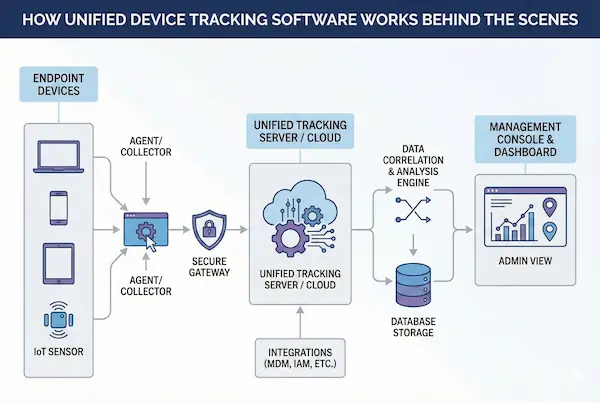
A modern setup needs to follow people across the main places they go online: phones, tablets, laptops, desktops and, in some cases, shared or kiosk style devices. The agent on each device should be small, quiet and consistent, so rules feel the same whether someone is on a school Chromebook, a work laptop or a family tablet.
2. Key data signals unified device tracking tools collect
Good tools do not try to hoard every possible data point. For unified device tracking for digital safety, they usually focus on a few high value signals: app and website categories, time of use, location when appropriate, and notable security events such as new logins or new devices. The goal is clear patterns, not an overwhelming wall of raw logs.
3. Core architecture of modern unified device tracking software
Behind the scenes there is usually a simple pattern: a lightweight agent on each device, a secure cloud service that normalises and stores events, and a central dashboard where adults set policies and review alerts. When you change a rule in the dashboard, every linked device should quietly update. When one device raises a concern, it should appear in the full context of that person’s recent activity across all their devices, which is what makes unified device tracking useful instead of noisy.
4. Integrations with parental controls, MDM and security tools
On its own, even strong unified tracking is only one piece of the safety stack. The better platforms plug into existing parental control features, school device management tools and corporate security systems. That allows you to reuse sign in, groups and policies you already have, instead of rebuilding everything from scratch, and turns unified tracking into a layer that strengthens the tools you rely on today rather than trying to replace them.
3. Unified Device Tracking For Digital Safety – Families, Schools, Businesses
Digital life looks very different for a 10 year old, a classroom full of teenagers and a distributed sales team, but the core problem is similar: too many devices, not enough context. This section shows how the same unified device tracking foundation can serve families, schools and businesses without treating them the same.
1. How families use unified device tracking to protect kids online
At home, parents mainly want confidence, not a full time job reading logs. With unified device tracking for digital safety, they can see a simple picture of each child across phone, tablet and shared computers: when they are online, which types of apps and sites they use most and when something crosses a line that the family has agreed.
Instead of micromanaging every message, parents set a few clear rules for screen time, bedtime, blocked content and allowed contacts. The tracking layer then works quietly in the background, surfacing only what really matters and giving parents enough detail to start a calm conversation rather than a panic reaction.
2. Unified device tracking for digital safety in schools and classrooms
Schools have a different challenge: dozens or hundreds of students, each with one or more school managed devices. Teachers need students to stay on task and safe online, but cannot spend lessons chasing tabs and settings. A good unified device tracking software setup lets IT and safeguarding staff define age appropriate policies that follow each student from device to device.
In practice, that can mean consistent web filters, app allowances and exam modes, plus alerts when behaviour suggests bullying, self harm or other serious concerns. Because the data is tied to student profiles and groups, not just serial numbers, the school can respond in a structured way and document what was seen and how it acted.
3. Supporting remote and hybrid teams with unified device tracking at work
In businesses, the focus shifts to protecting people, data and assets while still respecting adult privacy and labour rules. Remote and hybrid teams often mix company laptops, work phones and sometimes personal devices used for messaging or email. Unified tracking helps security and IT teams see risky patterns early, such as unusual access, unsafe downloads or repeated attempts to move sensitive files.
Rather than inspecting every action, policies focus on defined risks, job roles and regulatory requirements. Clear onboarding materials explain what is monitored on company devices, what is not, and why. When something does go wrong, the same tracking history makes it easier to investigate and fix the issue without guesswork.
Quick comparison – family vs school vs business needs
Although these groups use the same core ideas, their goals and constraints are not identical. The table below highlights the main differences so you can see where your own situation sits.
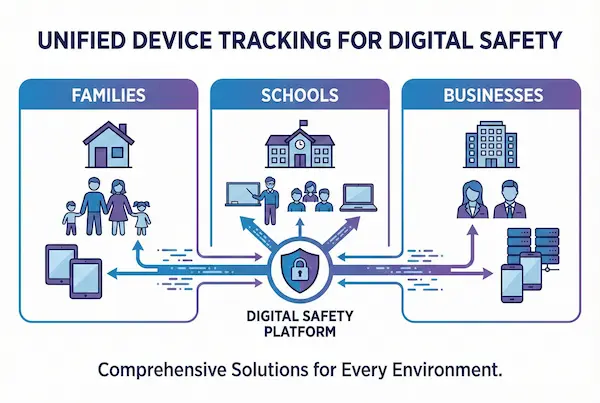
Table 1 – Snapshot: how unified device tracking supports families, schools and businesses
| Context | Main goals | Key risks and concerns | What unified device tracking adds | Extra considerations |
|---|---|---|---|---|
| Family | Keep kids safe and build good habits | Harmful content, strangers, excessive screen time | One view of each child across all devices, simple alerts and shared rules | Age, maturity, open conversations with kids |
| School | Safe, focused learning on school devices | Distraction, bullying, policy breaches | Policies that follow students across devices, evidence for interventions | Parent communication, education laws and policy |
| Business | Protect data, people and company assets | Data loss, misuse of devices, compliance issues | Early warning on risky behaviour across work devices and accounts | Labour law, privacy expectations, BYOD policies |
4. Privacy, Consent And Ethics In Unified Device Tracking
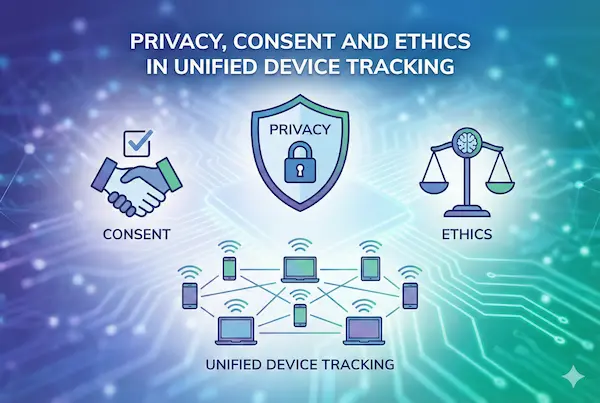
When safety tools touch real people and real devices, the question is no longer just “does it work”, but “is it fair”. A tracking layer that ignores privacy, consent and clear boundaries will eventually fail, no matter how advanced the technology looks on paper.
1. Ethical principles for responsible unified device tracking
Any serious system should start with three simple ideas: collect less, use it for clear purposes and match the level of monitoring to the level of risk. That means only gathering signals that genuinely help with protection, not everything that is technically possible. It also means writing down why data is collected, how long it is kept and who is allowed to see it. For families, schools and workplaces, this helps keep the focus on digital safety instead of drifting into general surveillance.
2. Consent models for parents, students and employees
Different groups need different consent stories. Parents have broad responsibility for young children, but older teenagers should still know that a safety tool is present and what it does. Schools usually work within a mix of policy, enrolment terms and parental agreements, and should explain clearly what is monitored on school devices. Employers, in turn, are expected to give staff written notice about monitoring on company equipment, distinguish work from private use where possible and align with local labour and privacy rules.
3. Building transparency into unified device tracking for digital safety
Transparency is what turns a hidden control system into a shared safety tool. Clear welcome screens, simple policy pages and easy to read dashboards all help users understand what is being watched, what is not and how alerts are handled. Some setups allow families, students or staff to see part of their own activity summary, which can support healthier conversations about habits instead of secret checks. When people know the rules and can predict how the system behaves, trust is much easier to maintain.
4. Legal and compliance considerations you should not ignore
Laws differ by country, but most now expect organisations to justify any monitoring, protect stored data and give users basic rights over their information. That might include access to records, correction of errors and clear routes to raise concerns. For anyone deploying tracking across many devices, it is wise to map out which regulations apply, document decisions with legal or compliance input and review settings regularly. A tool that respects these boundaries is far more likely to be accepted by families, educators, staff and regulators over the long term.
5. How To Evaluate Unified Device Tracking Software Vendors
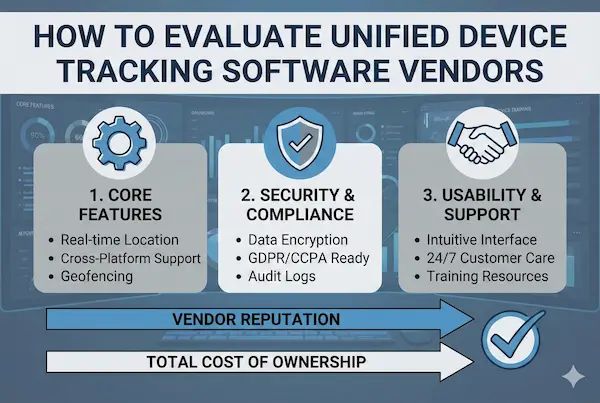
Choosing the right platform is less about glossy features and more about whether the service is safe, stable and fits how your family, school or business actually works. A poor choice can create more noise and risk than it removes.
1. Security and data protection checklist
Start with how the vendor protects information, not with their marketing demo:
- Encryption in transit and at rest
- Clear policy on data location, retention and deletion
- Strong access control for admins and support staff
- Documented process for incidents and breach notification
Ask for written answers, not just verbal promises.
2. Must have features vs nice to have extras
List what you truly need before you see any sales deck. For most buyers, essentials are:
- Coverage for the main operating systems you use
- Role or group based policies
- Reliable alerts and simple reports
Gamification, complicated scoring or flashy dashboards are optional. If a feature does not clearly support safety or management, treat it as a bonus, not a reason to buy.
3. Total cost of ownership
Look beyond the headline subscription price. Include:
- Licence model per user or per device
- Support and training costs
- Integration work with your existing systems
- Time your team will spend on setup and ongoing tuning
A cheaper plan that needs constant manual effort can cost more than a slightly higher fee for a well designed service.
4. Red flags when comparing vendors
Be cautious if you see any of these:
- Vague answers about where data is stored or who can access it
- No clear documentation or audit logs
- Heavy focus on spying rather than safety, education and trust
- Aggressive discounting without solid references in your use case
A good provider should be comfortable with tough questions and happy to prove how their platform protects both people and data.
6. Implementation Roadmap – From Pilot To Full Rollout
Rolling out unified device tracking works best when you treat it as a change in culture and process, not just another app to install on devices.
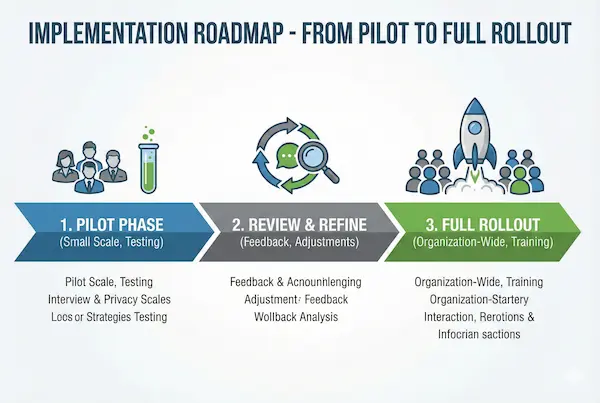
1. Define goals and risk profiles
Start with why you are doing this at all. For a family, it might be reducing late night screen time and blocking harmful content. For a school, it could be keeping students focused in class and spotting serious welfare signals. For a business, it is usually about protecting data, people and company assets. Write down your top risks, the groups you care about most and what “success” would look like in six to twelve months.
2. Design policies, roles and rules
Before anything is deployed, decide who sets rules, who reviews alerts and who can see detailed activity. Keep policies simple and aligned with age or job role, and make sure they are written in language normal people can understand. Prepare short explanations or FAQs for kids, students or staff so they know what is monitored, what is not and how to raise concerns.
3. Run a focused pilot
Choose a small, clearly defined group for your first phase: one family profile, a single year group, or one team or office. Limit the number of rules, watch how many alerts you get and collect feedback from both admins and users. Use this phase to tune thresholds, remove noisy notifications and spot any technical or privacy issues before you scale further.
4. Scale gradually and keep improving
Once the pilot feels stable, expand in waves instead of switching everyone on at once. After each wave, review key metrics such as alert volume, serious incidents, support tickets and user feedback. Adjust settings, improve training materials and update policies as needed. Treat this as an ongoing cycle rather than a one time project, so the system stays useful as people, devices and risks change.
7. Latest Trends Shaping Unified Device Tracking And Digital Safety
Tools and policies around screens never stand still. The latest wave of unified device tracking software is being shaped by AI, new platform rules and tighter expectations from parents, schools and regulators about how far monitoring should go.
1. AI assisted risk detection instead of fixed rules
Older systems relied on rigid filters and simple time limits. Newer platforms add machine learning to spot unusual patterns, such as sudden spikes in late night use, changes in social interactions or risky login behaviour. AI is not there to replace human judgment, but to highlight which profiles deserve a closer look so adults are not buried in low value alerts.
2. From single device to identity based protection
Vendors are moving away from tools that only care about one phone or laptop. Instead, protection increasingly follows an account or identity across devices and networks. That makes it easier to keep rules consistent when people switch between home, school and work, and to distinguish normal behaviour for one person from suspicious access that does not fit their usual pattern.
3. Platform, browser and policy changes
Operating systems, browsers and large platforms continue to add new privacy controls, app restrictions and security prompts. These changes can quietly break older monitoring tools or limit what they can see. Modern tracking solutions have to respect those limits, use official APIs where possible and adapt quickly when a major update changes how permissions, notifications or background services work.
4. What these trends mean for the next few years
Taken together, these trends point toward safety tools that are more contextual, more transparent and less noisy. Families, schools and businesses will expect fewer raw logs and more clear, explainable insights. Solutions that balance strong protection with visible boundaries, honest communication and lean data collection are the ones most likely to be trusted and to last.
8. Case Studies – Unified Device Tracking In Action
Real stories make it clearer what unified device tracking can and cannot do. The examples below show how a family, a school and a business moved from scattered tools to a single safety layer, and what changed in daily life.
1. Family – from three apps per child to one safety view
A family with two teenagers was juggling separate apps for location, screen time and content filters on each device. Parents were checking multiple dashboards every night and still felt they were missing things.
After moving to one central safety hub:
- Both kids had profiles that followed them across phone, tablet and shared laptop
- Parents set simple rules for bedtime, blocked content and allowed contacts
- Alerts dropped to a few meaningful notifications per week instead of constant pings
The main change was emotional: less panic scrolling through logs, more calm conversations built on clear patterns.
2. School – managing one to one devices without chaos
A secondary school had rolled out laptops to every student, but behaviour tools were fragmented by year group and device type. Teachers complained about distraction in class and IT staff were overwhelmed by ad hoc block requests.
With a unified safety console tied to student accounts:
- Policies were set by age band and subject, then applied across all school machines
- Exam sessions used locked down modes that could be turned on and off by schedule
- Safeguarding staff saw early signals of bullying and self harm risk, with context
Instead of chasing individual devices, the school worked from clear profiles and documented responses.
3. Business – securing a remote sales team
A regional sales team used company laptops, work phones and occasionally personal devices for messaging. Security only saw part of the picture and had to piece together incidents from different logs.
After standardising on one monitoring and alerting layer:
- Access to sensitive apps was tied to user identity and role, not just a device name
- Risky downloads and repeated login failures triggered focused alerts
- Managers received simple reports on policy breaches without raw technical noise
The team stayed mobile and flexible, but the company had a much clearer view of where data was going and when to step in.
4. Lessons that repeat across all three stories
Across family, school and business, a few patterns keep appearing:
- Consolidating tools into one safety view reduces blind spots and decision fatigue
- Clear, written rules make it easier for people to accept monitoring
- The most value comes from a small number of well tuned alerts, not from maximum data collection
These are useful benchmarks when you design your own setup, no matter how many devices or users you are responsible for.
FAQs – Unified Device Tracking For Digital Safety
1. What does this approach actually do and who needs it most?
It connects activity from multiple devices to a single profile, so you see one clear picture instead of scattered logs. Families, schools and organisations with many devices per person benefit the most.
2. Is this kind of tracking legal for parents, schools and employers?
It is generally legal when used for clear safety or security goals, with proper policies, notice and respect for local privacy and labour laws. The details depend on your country and context.
3. Does it monitor everything people do on their devices?
No. Well designed setups focus on key signals such as app and web categories, time patterns and important security events, not every click or word. The aim is to surface risk, not record a full transcript.
4. How is this different from simple phone tracking apps?
Phone trackers usually watch one device at a time. Here, the focus is on the person or role across all their devices, so patterns are easier to spot and policies stay consistent when they switch screens.
5. Can it still respect privacy?
Yes, if it collects the minimum data needed, limits who can see it, keeps clear retention rules and is explained in plain language to those being monitored.
6. What should families look for in a product like this?
They should look for simple profiles per child, clear time and content rules, age appropriate defaults and reports that parents can understand without technical skills.
7. What should schools and businesses check before rolling it out?
They should check data protection standards, role based policies, reporting tools, integration with existing systems and whether the vendor can support audits and compliance reviews.
8. How do you know if the system is working well?
Alert volume stays manageable, serious issues are spotted earlier, users understand the rules and you spend less time chasing raw logs and more time having useful conversations about behaviour.
Conclusion And Next Steps
The core idea is simple: people live across many screens, but most safety tools still think in terms of one device at a time. Unified device tracking ties those screens together so families, schools and businesses can see real patterns and act earlier, with less stress and guesswork.
Table 3 – Who benefits most and how to start
| Situation | Priority | Main benefit | First step |
|---|---|---|---|
| Busy families | High | Safer habits, fewer blind spots | Create profiles for each child, set basics |
| Connected schools | High | Consistent rules, better safeguarding | Pilot on one year group or small cohort |
| Small businesses | Medium | Clearer view of risky device behaviour | Start with one team on company devices |
| Remote / hybrid teams | High | Better protection for people and data | Roll out to laptops and work phones first |
Use this as a quick mirror: find the row closest to your reality, then define 2-3 goals and a small pilot group instead of trying to fix everything at once.
Start small with PhoneTracker247
If you want to move from theory to something you can test this month, a focused family or small team pilot with PhoneTracker247 is a clean way to begin:
- One dashboard instead of several separate apps
- Profiles that follow each person across their main devices
- Simple time and content rules, plus clear, human readable summaries
Pick one or two profiles, add the devices they use most, set a few sensible limits and review how the next few weeks feel. If stress drops, conversations get easier and you spend less time jumping between tools, you will know this approach fits – and you can grow the same model with PhoneTracker247 at the centre of your digital safety setup.
For daily updates, subscribe to PhoneTracker’s blog!
We may also be found on Facebook!