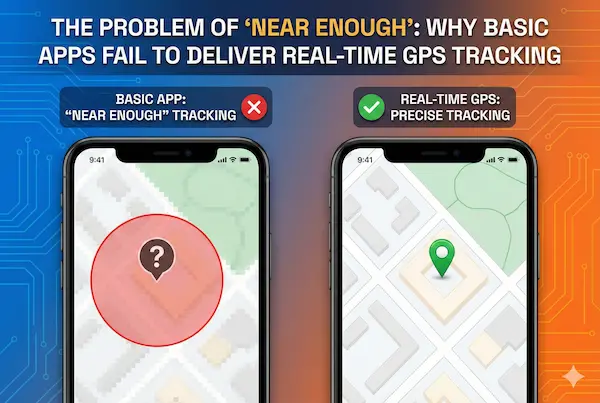
Most people only notice a problem when the map and real life stop matching. A courier looks stuck two streets away, then suddenly rings your doorbell. A dot shows your kid still near school while they are already on the bus. The app was sold as real time GPS tracking, but what you get is a choppy, delayed picture that feels more like a replay than a live feed. When timing and distance really matter, that “near enough” gap is not just annoying – it quietly breaks promises, service levels and sometimes even safety plans.
Contents
- 1 The Near Enough Problem – When “Close” Is Not Good Enough
- 2 Why Basic Apps Are Not Truly Real Time
- 3 What Real Time GPS Tracking Actually Means Today
- 4 Where Basic Location Apps Fall Short
- 5 High Stakes Use Cases That Need True Real Time GPS Tracking
- 6 Under The Hood – Why Real Time GPS Tracking Is Hard
- 7 Myths And Reality – What “Live” Claims Really Mean
- 8 Trade Offs – Battery, Data, Privacy And Cost
- 9 Architectures For Real Time GPS Tracking
- 10 Feature Checklist – How To Evaluate “Real Time” Claims
- 11 Implementation Patterns For Families, Fleets And Field Teams
- 12 Case Studies – When Near Enough Broke Things
- 13 FAQs – Real Time GPS Tracking
- 14 Conclusion
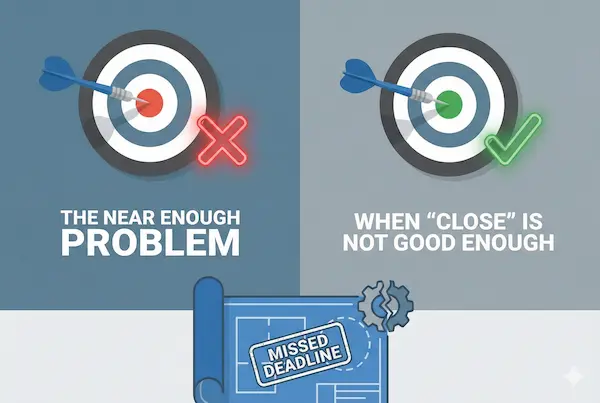
The Near Enough Problem – When “Close” Is Not Good Enough
Most basic location apps are built on the idea that “almost live” is fine. That works for casual use, but it breaks down fast when people start relying on real time GPS tracking for promises, ETAs and safety.
1. The everyday gap between map and reality
You see it all the time: the app shows the driver still at the corner, then they are suddenly at your door; a child’s dot looks stuck while they are already on the move. The map is only slightly off, but the result is missed deliveries, pointless worry and unnecessary calls.
2. Why small errors become big problems in high stakes moments
A delay of half a minute or a few dozen meters sounds minor until you are working with tight time windows, handovers or escorts. In those moments, that small gap decides whether someone is on time or late, safe or exposed. What looks like a tiny technical error becomes a real world failure.
3. How “good enough for casual use” fails under pressure
Most consumer apps are tuned for saving battery and data, not for strict accuracy under load. When the same tools are reused for fleets, field teams or safety critical scenarios, the design no longer fits the job. The result is a tracking layer that looks modern, but cannot cope when pressure rises.
Why Basic Apps Are Not Truly Real Time
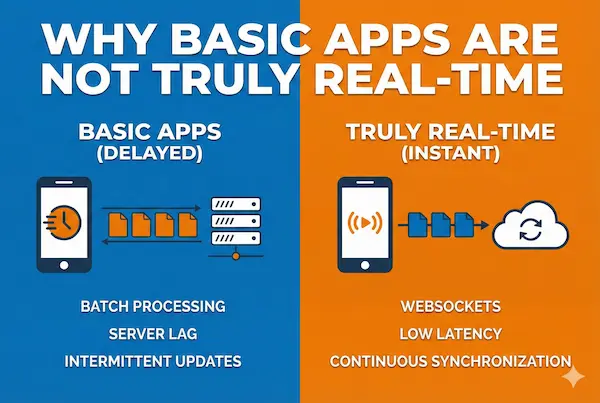
Before we dive into architecture and networks, it helps to be clear on one point: most basic apps that promise real time GPS tracking are only giving you a polished illusion of live movement, not a truly timely signal you can rely on when seconds matter.
1. Simple definition – what real time GPS tracking really means
In plain language, real time GPS tracking means a device sends its position often enough, and with low enough end to end delay, that what you see on the map is very close to what is happening on the road right now. It is not about perfection to the exact meter or millisecond. It is about updates that are frequent, predictable and clearly timestamped so you always know how fresh each point really is.
2. How basic apps simulate “live” with slow refresh and batching
Most basic apps are designed to save battery and data, not to hit strict timing targets. They wake up every 30 or 60 seconds, collect a few points, then send them in a batch. The interface then draws a smooth line and moves the dot as if the device were being tracked continuously. On a quiet day this looks fine, but under the hood the system is always a few steps behind. What is sold as live is usually delayed, throttled and heavily cleaned up to look better than it really is.
3. One paragraph quick answer for busy readers
If you only need the short version, it is this: most apps that advertise real time GPS tracking are actually doing periodic updates that are good enough for casual use but too slow and opaque for high stakes work. True real time tracking keeps delays small and consistent, shows you exactly when a device was last seen and does not hide gaps or weak signal behind pretty animations.
What Real Time GPS Tracking Actually Means Today
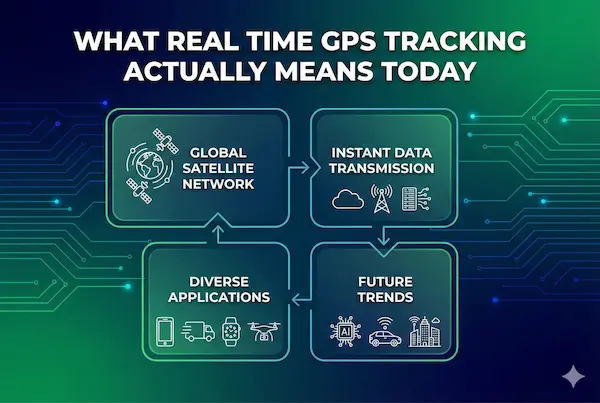
People talk about real time GPS tracking as if it were a magic switch: on or off, live or not. In reality it is a spectrum, and most systems sit somewhere between “fresh enough” and “too late to be useful”. This section turns the buzzword into something you can measure and design around.
1. Technical definition – latency, refresh rate and end to end delay
From a technical point of view, real time is about timing. The device has to calculate its position, send it over the network, let the server process it and then render it on a screen. The total of those steps is your end to end delay. A system that refreshes every 5 to 10 seconds with stable, known latency behaves much closer to true real time than one that batch updates every minute but draws a smooth line to hide the gaps.
2. Practical thresholds – what feels real time to humans
Humans do not notice every millisecond. For many family and light business uses, seeing movement update every 10 to 20 seconds feels live enough. For fleets in traffic or escorts on foot, people may expect 2 to 5 second updates. The key is to set a target and stick to it. A slightly slower real time GPS tracking setup that is consistent will usually feel more trustworthy than a very fast one that stutters, freezes and then jumps.
3. Designing around perception, not theoretical perfection
Chasing zero delay is expensive and rarely necessary. A better approach is to decide what “live enough” means for your use case, then design for that level with clear communication in the interface. Show timestamps, last seen labels and signal status so users know what they are looking at. When people can see how fresh the data is, real time GPS tracking stops feeling like a guess and starts feeling like a measured signal they can use to make decisions.
Where Basic Location Apps Fall Short
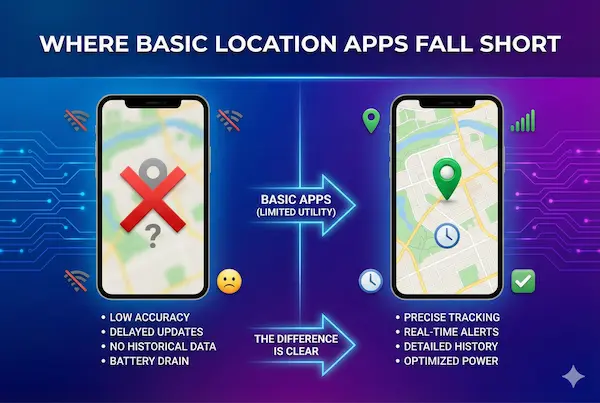
Once you know what real time GPS tracking should look like, it becomes easier to see why most basic apps miss the mark. They are usually tuned for “nice map, low battery use”, not for tight timing or clear status when things go wrong.
1. Slow polling and background limits
Many consumer apps only wake up every 30, 60 or even 120 seconds to grab a location fix. On top of that, iOS and Android both restrict what apps can do in the background to save power. The result is long, uneven gaps between updates, especially when the screen is off, even though the interface still feels “live”.
2. Batching, snapping and cleaned up movement
To save data and make routes look pretty, basic apps often batch multiple points and snap them to roads or paths. The line looks smooth, but you are seeing an edited replay, not a true stream. This is why a dot can jump from one place to another with no sign of what happened in between, which quietly breaks the idea of real time GPS tracking.
3. Platform behaviours that quietly break real time
Modern phones are aggressive about saving battery. Power saver modes, app sleep features and permissions can all pause or slow location updates without warning. If the app does not tell you when this happens, you are left staring at a dot that looks solid but is actually minutes old. From the outside it feels like bad luck; from the inside it is simply a system that was never designed to guarantee live behaviour in the first place.
High Stakes Use Cases That Need True Real Time GPS Tracking
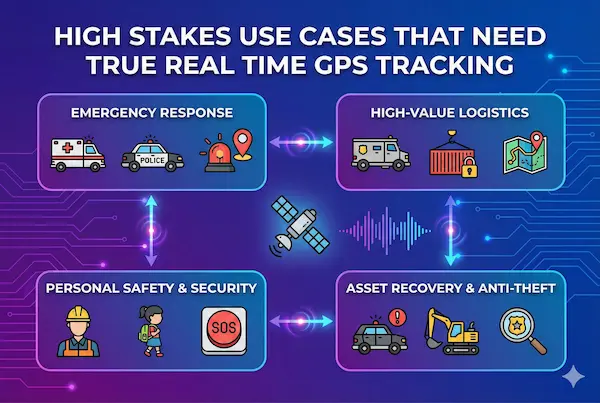
Not every situation needs second by second updates. But some moments are unforgiving: if the map is late, the opportunity is gone. Here, “near enough” tracking is not just inconvenient, it can actively get in the way.
1. Safety and security – people in motion, panic events and escorts
When you are following a lone worker at night, a child on an unfamiliar route or a staff member in a risky area, those extra seconds matter. If location only updates in big jumps, you cannot tell if someone has stopped in a safe place or is stuck somewhere they should not be. In these cases, real time GPS tracking is about shortening the time between “something is wrong” and “we know where to go”.
2. Operations and service – fleets, field teams and tight windows
For fleets, field engineers, installers and delivery teams, timing is the product. Dispatchers need to see who is closest to a job, whether someone will make a time window and which route is still realistic in heavy traffic. If updates are slow or irregular, ETAs turn into guesses, customers wait longer than promised and planners lose their main advantage: a shared, live picture of what is happening on the road.
3. Assets and logistics – high value cargo and dynamic routing
When vehicles carry high value cargo, sensitive equipment or critical parts, knowing where they were five minutes ago is not enough. Operations teams need to see whether a truck actually took the planned route, whether a trailer has stopped in an unexpected area and how to reroute around incidents. True real time GPS tracking turns static plans into something you can adjust on the fly instead of finding out what happened after it is too late to change anything.
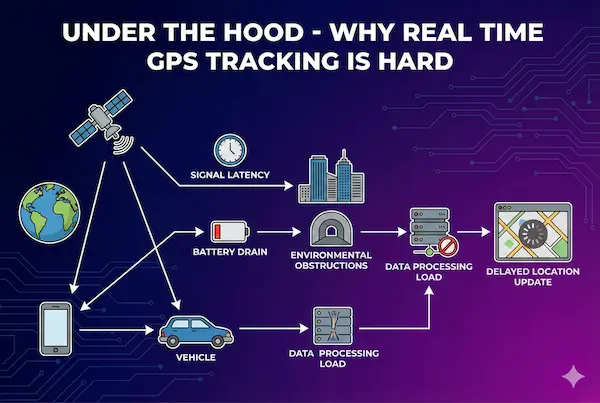
Under The Hood – Why Real Time GPS Tracking Is Hard
If real time GPS tracking were easy, every basic app would already be nailing it. In practice, three layers keep getting in the way: the phone, the network and the backend that has to draw everything on a map fast enough to feel live.
1. Device limits – sensors, battery and operating system rules
A phone has to find its position, keep radios awake and push updates out, all while staying cool and keeping enough battery for the rest of the day. iOS and Android both put tight limits on what apps can do in the background, especially with location. If an app pushes too hard for real time GPS tracking, the operating system will often slow it down or kill it to protect the device.
2. Network limits – coverage, handoffs and congestion
Even perfect GPS is useless if the data cannot leave the phone in time. Weak coverage, crowded networks, building shadows and constant cell handoffs all add delay. A device might calculate its position quickly but only manage to upload it in bursts. On a live map that feels like freezing and jumping, not smooth tracking.
3. Server and rendering limits at scale
On the other side, servers have to accept thousands of updates per second, store them, process rules and send clean views back to browsers and apps. If the pipeline is not built for streaming, updates queue up and arrive late. The result is a system that looks like real time GPS tracking from the outside, but is actually replaying slightly old information because the backend cannot keep up.
Myths And Reality – What “Live” Claims Really Mean
Scroll through any app store and you will see the same words again and again: live, instant, real time, pinpoint. On paper, almost every tool claims to offer real time GPS tracking. In practice, many of those claims quietly rely on tricks that hide delay instead of removing it.
1. Common myths around real time GPS tracking
A few ideas show up so often that people start to treat them as facts:
- If the dot is moving smoothly, it must be live
- If the route looks clean, the data must be accurate
- If the app says “instant updates”, delay does not matter
- If battery impact is “almost nothing”, tracking is still real time
- If it worked once in perfect conditions, it will work the same everywhere
These myths make it easy for basic apps to over promise without ever writing down hard numbers.
2. Reality – what typical refresh and delays look like
In the real world, many consumer tools fetch location every 30, 60 or even 120 seconds, especially in the background. Some will only upload when the phone is on Wi Fi or has strong data. The interface then animates the dot to make it feel smoother than it is. From the outside it looks like real time GPS tracking. Under the hood, the system is often running on slow polls, batched uploads and best effort delivery through messy networks.
3. How to decode vague “live” marketing language
You do not need to read source code to tell the difference between marketing and reality. You can ask simple questions:
- How often does the app update location in typical use, and what is the worst case delay
- Can I see a clear “last seen” time for each device
- What happens when the phone loses signal or goes into power saving mode
- Is there any documentation of battery impact at different update rates
If a product talks a lot about “live” but never answers these questions, it is probably giving you “near enough” rather than the kind of real time behaviour you can plan around.
Myth vs reality – real time GPS tracking claims
| Marketing claim | What it usually means in practice |
|---|---|
| “Live GPS tracking” | Updates every 30-120 seconds in good conditions |
| “Instant location updates” | Best effort, still delayed by device and network |
| “Pinpoint accurate in real time” | Good outdoors, weaker indoors or in dense urban areas |
| “No impact on battery life” | Achieved by slowing or reducing tracking frequency |
| “Works anywhere” | Works where GPS and data coverage are both available |
Trade Offs – Battery, Data, Privacy And Cost
Every time you push closer to true real time GPS tracking, you pay for it somewhere else. If an app pretends you can have zero delay with zero cost, it is hiding something important.
1. Battery and device wear
Fast, frequent updates mean the GPS chip, radios and CPU stay busy. That drains battery faster and can warm up the device. To keep phones usable for a full day, basic apps slow their tracking down. Any serious setup has to be honest about this and give you clear choices: smoother tracking with more battery use, or slower updates with longer life.
2. Data usage and infrastructure costs
Location points may look tiny, but sending them every few seconds from many devices adds up. Someone has to pay for mobile data, servers, storage and streaming pipelines. Consumer tools often cut corners by updating less often and batching positions. Professional real time GPS tracking systems usually charge a subscription or bundle the cost into a service, because there is no magic way to run all of this for free.
3. Privacy and legal exposure at high frequency
High frequency tracking does not just show where someone was once. It can reveal routines, habits and sensitive places like homes, clinics or workplaces. The more detailed the trail, the more damage if it is misused or leaked. That is why real time setups need clear retention rules, access control and consent. Without those safeguards, the same precision that makes tracking powerful also makes it risky to keep.
Architectures For Real Time GPS Tracking
Behind every clean map view is an architecture that decides how fast, how reliable and how expensive your real time GPS tracking will be. Even if you never write code, it helps to know the basic patterns so you can tell whether a system was built for casual check ins or for serious live use.
1. Device centric – the phone does most of the work
In a device centric design, the app on the phone is in charge. It decides when to get a GPS fix, how often to send data and what to do when the network is weak. This works well for small groups and family style tracking because it is simple and flexible. The downside is that every phone behaves slightly differently, and without a strong backend, real time GPS tracking can become inconsistent across devices and platforms.
2. Cloud centric streaming – the server is built for live data
In a cloud centric architecture, the phone focuses on sending small updates quickly and the backend is built like a streaming system, not a basic web app. Messages flow through queues and workers that can scale up under load, dashboards refresh from live streams and alerts trigger on fresh events instead of nightly batches. This pattern is harder to build but is usually what you find behind reliable fleet tracking and operations tools.
3. Hybrid approaches – adapting to conditions in the real world
The most robust setups mix both ideas. The device can buffer points when offline, slow down updates when nothing interesting is happening and speed up when motion or risk increases. The cloud side can smooth out noise, detect problems and feed only the most useful changes to users. Hybrid designs accept that networks are messy and phones have limits, then work around those facts instead of pretending that real time GPS tracking means a perfect
Feature Checklist – How To Evaluate “Real Time” Claims
Most people will never see the code behind a tracking system, so the only protection you have is knowing what to ask for. A product that really delivers real time GPS tracking will be happy to talk about numbers, limits and edge cases. One that hides behind vague words like “live” and “instant” is usually just repainting the same “near enough” problem.
1. Core performance metrics to demand
Start with timing. Ask how often the app updates location in normal use, what the worst case delay is and how that changes between foreground and background. A solid provider can tell you the typical refresh rate, expected latency and how those values change on poor networks. If they cannot give a range in seconds, they are not really treating real time as a measurable goal.
2. Monitoring and observability you should see
Next, look at what the interface tells you. Each device should show a clear “last seen” time, current signal status and whether GPS has a good lock or is only guessing from nearby towers and Wi Fi. For fleets and teams, there should be some kind of health dashboard so you can spot when tracking is lagging. Without these signals, you are flying blind and have no way to judge whether real time GPS tracking is working today or only looked good once in a demo.
3. Hard questions about outages and edge cases
Finally, ask what happens when things go wrong. How does the system behave if a phone loses coverage, enters power saving mode or reboots on the road. What happens if the server side has an outage. Is there any buffering on the device, and will you see clear gaps on the map when data could not be sent. Honest answers to these questions are a good sign that the system has been designed for the real world, not just for marketing copy.
Feature checklist – evaluating real time GPS tracking
| Area | What to look for | Red flag to avoid |
|---|---|---|
| Refresh rate | Clear numbers for typical and worst case latency | Vague “live” or “instant” with no metrics |
| Status indicators | Last seen time, GPS and signal status | Static dots with no context |
| Battery profile | Documented impact at different update intervals | “No impact” claims with no technical detail |
| Data controls | Retention, export, delete and access controls | No way to manage or delete historical tracks |
| SLA and support | Uptime targets, support channels, escalation paths | No mention of uptime, support or responsibility |
Implementation Patterns For Families, Fleets And Field Teams
The same tracking engine can feel very different depending on how you present it and which rules you attach to it. When the pattern fits the people using it, location sharing feels helpful instead of intrusive, and real time GPS tracking becomes something everyone can explain and accept.
1. Family pattern – simple, explainable tracking
In a family setting, the goal is peace of mind. The app should show a clean map, a clear “last seen” time and simple switches to pause or share location. Parents and kids need to agree when sharing is on, who can see it and how to turn it off. Update speed does not have to be extreme, as long as it is consistent and the app is honest about how fresh the data is.
2. Fleet pattern – dispatcher view, ETAs and alerts
For fleets and delivery teams, timing and coverage are part of the service promise. Dispatchers need a console that shows many vehicles at once, current routes, ETAs and alerts when something goes off plan. Drivers need a simple view on their own device, while managers need history, reports and access control. In this environment, real time GPS tracking only works if everyone has the same shared picture and can act on it quickly.
3. Field team pattern – on device awareness and safety
Field technicians, engineers and reps spend much of their day alone on the road. They need a mobile view that helps them plan stops, confirm addresses and call for support if something goes wrong. Useful features include offline buffering, check ins, a clear indicator when tracking is active and a simple way to raise a safety alert. When these tools are framed as support, not surveillance, people are far more willing to keep them on.
Case Studies – When Near Enough Broke Things
Real stories make it easier to see why timing and accuracy matter. These short examples show how “almost live” location caused problems that a stronger real time GPS tracking setup could have avoided.
Case 1. Missed delivery window
A courier company relied on a basic location layer inside a consumer navigation app. Updates came in roughly every minute. On a busy day, a driver arrived on time but the map still showed them two streets away. The customer stepped out for a moment, missed the doorbell and the delivery failed. The report said “driver late”, but in truth the location layer was the part that fell short.
Case 2. Safety scare during an emergency
A lone worker used a check in feature that shared their position with a supervisor. The app only refreshed when the phone woke up. When the worker pressed a panic button after a fall, the map still showed their last stop, not the actual place they were hurt. It took extra calls and precious minutes to work out where they really were. The supervisor later said that the technology gave them false confidence instead of real help.
Case 3. Operational waste from inconsistent tracking
A service business tried to coordinate several vans using a free tool. Sometimes positions were almost live, sometimes they lagged by several minutes. Dispatchers stopped trusting the map and went back to constant phone calls. Drivers felt they were being watched and still had to answer “where are you now” all day. The company ended up with the worst of both worlds until they moved to real time GPS tracking that was built for operations instead of casual use.
FAQs – Real Time GPS Tracking
1. What is real time GPS tracking in simple terms?
It is a system where a device sends its location to a server every few seconds so you can see where it is on a map with only a small, predictable delay.
2. Is real time GPS tracking truly instant, like a live video?
No. There is always some delay from sensors, the network and servers. The goal is to keep that delay small and consistent, not to reach zero.
3. When do I really need real time GPS tracking instead of basic location sharing?
You usually need it for safety escorts, tight delivery windows, live fleet control or high value cargo. For casual meetups or family check ins, slower updates are often enough.
4. Why does my map sometimes jump, freeze or look wrong?
This usually happens because the phone has weak signal, the app is in the background or the system is batching points to save battery. The map may try to animate between old points to look smoother.
5. Does faster tracking always mean more battery drain?
Faster updates do use more power, but a well designed app can balance frequency with smart rules so the device still lasts the day under normal use.
6. Can I make a basic app behave more like live tracking?
You can sometimes improve things by allowing background location, disabling aggressive power saving and keeping data on. Even then, platform limits and app design will cap how close to real time it can get.
7. Is it safe to use high frequency tracking for staff or family?
It can be, but only with clear consent, written rules and limits on who can see the data and how long it is stored. Without that, detailed trails quickly become a privacy and trust problem.
8. How should I compare different tracking products?
Ask about refresh rate, worst case delay, battery impact, “last seen” indicators and data control. A serious provider can answer in seconds and show you numbers, not just the word “live”.
Conclusion
Almost live was good enough when maps were just a nice extra. It is not enough when customers, families and teams plan around what they see on screen. If a system claims real time GPS tracking but never shows refresh rate, last seen time or clear status, you are running on guesswork, not live data.
Quick summary
| Question | Honest target |
|---|---|
| Is it truly live | You know delay in seconds and show clear “last seen” times |
| What breaks most | You can name main gaps: signal, background, slow backend |
| How you explain the map | Users know what it can and cannot prove |
| Privacy and data handling | Written rules on access and retention |
| Next concrete step | Pilot with a provider like PhoneTracker247 |
Next steps with PhoneTracker247
You do not need to rebuild everything at once.
- Pick 1 or 2 painful use cases where delays really hurt.
- Choose a small set of devices or routes to test.
- Move them to a platform built for serious tracking, such as PhoneTracker247.
- Set simple rules for consent, working hours, access and retention.
After a few weeks, compare results: fewer missed windows, fewer map arguments, clearer decisions. If the pilot proves that PhoneTracker247 delivers stable timing and visible status, you will know you have moved from “near enough” to real time GPS tracking you can explain and trust.
For daily updates, subscribe to PhoneTracker’s blog!
We may also be found on Facebook!