Social media plays a central role in how children and teenagers communicate, learn, and express themselves. Platforms such as Instagram, TikTok, Snapchat, and Discord shape daily interactions, influence emotional development, and expose young users to a constant stream of information. While these platforms offer creativity and connection, they also introduce serious risks that parents cannot ignore.
Common concerns include exposure to inappropriate content, cyberbullying, online predators, privacy violations, and unhealthy screen time habits. As children gain access to smartphones at younger ages, parental control social media tools have become essential for families who want to protect children while still respecting their growing independence.
This guide explains how parental control social media tools work, how different platforms approach child safety, and how parents can use these tools responsibly to support healthy digital behavior rather than enforce strict control.
Contents
Why Parental Control on Social Media Matters
Children are using social media earlier than ever before, often before they fully understand online risks. Although most platforms claim to offer age-based safety features, these settings are not always enabled automatically or configured effectively.
Effective parental control social media strategies help parents:
- Limit exposure to inappropriate, violent, or sexual content
- Reduce the risk of cyberbullying and online harassment
- Prevent contact from strangers or unknown adults
- Manage excessive screen time and unhealthy usage habits
- Protect children’s personal data and online privacy
- Teach responsible digital behavior and critical thinking
Parental control social media is not about banning. It is about guiding children toward safe, age-appropriate, and responsible use while maintaining trust and open communication.

How Parental Control Social Media Tools Work
Most parental control features on social media platforms focus on supervision rather than surveillance. Instead of allowing parents to read private conversations, these tools provide insight into usage patterns and safety settings.
Common categories of parental control social media tools include:
- Screen time management to track usage and set daily limits
- Content filtering to reduce exposure to sensitive material
- Privacy and account visibility controls
- Contact and messaging restrictions
- Activity insights that show patterns without revealing message content
Because parental control features vary widely across platforms, parents should review and configure each app individually rather than relying on default settings.
Table 1: Comparison of Social Media Parental Control Approaches
| Approach | What it controls on social media | Strengths | Limitations | Best for |
|---|---|---|---|---|
| OS built-in controls (iOS Screen Time, Android Family Link) | App time limits, schedules, downtime, app install approvals | Free, reliable, works across many apps | Limited insight into in-app content and chats | Most families starting out, younger teens |
| Social app built-in teen/family tools | Privacy defaults, time reminders, friend/follower controls (varies by app) | Directly targets platform-specific risks | Features vary by region, age, and updates | Kids using 1 to 2 main platforms heavily |
| Network-level filtering (router/DNS) | Blocks or limits access to domains and services | Works for all devices on Wi-Fi, hard to bypass for younger kids | Does not work well on mobile data, limited per-app control | Whole-home baseline protection |
| Third-party parental control app (PhoneTracker247, others) | App limits, schedules, usage visibility, alerts (feature sets vary) | More options in one place, multi-device dashboards | Some features depend on device OS limits and permissions | Parents who need stronger routines and reporting |
| Family rules and coaching plan (no tools) | Expectations, boundaries, reporting, consequences | Builds trust and long-term judgment | Needs consistency and ongoing conversation | Older teens, families prioritizing independence |
Parental Control Social Media by App
Parental control social media tools are not one-size-fits-all. Each app offers different safety features, limitations, and supervision options, making it essential for parents to understand controls on a platform-by-platform basis.
Instagram Parental Controls
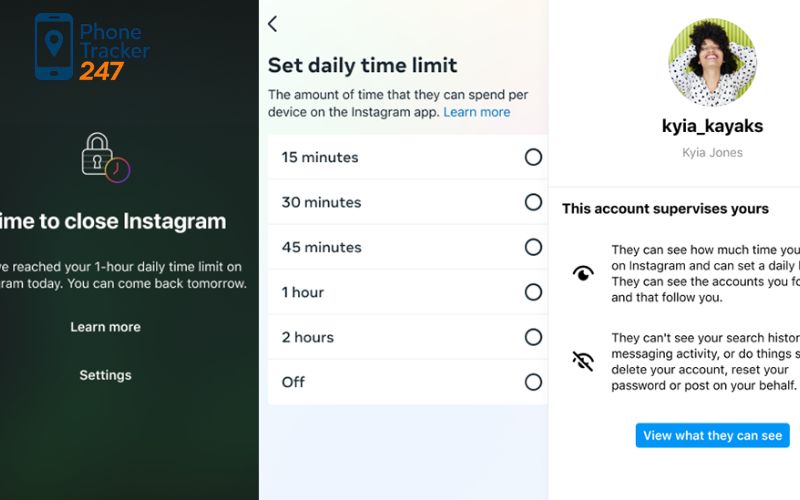
Instagram offers parental supervision through its Family Center, which requires the child to accept a supervision invitation. This supervision automatically ends when the child turns 18.
Key Instagram parental control features include:
- Viewing daily activity and setting screen time limits
- Seeing who the child follows and who follows them
- Reviewing privacy and security settings
- Limiting sensitive or recommended content in feeds
Instagram does not allow parents to view private messages or search history. This approach helps balance safety with personal privacy and encourages trust between parents and children.
TikTok Parental Controls
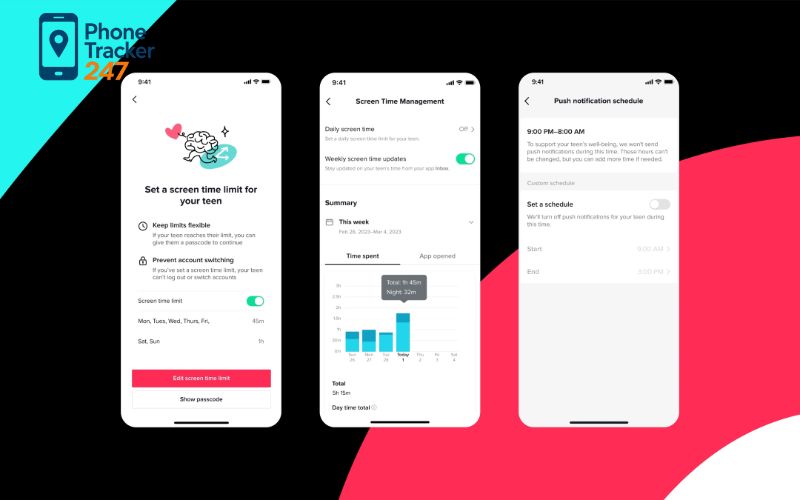
TikTok provides one of the most comprehensive parental control social media systems through its Family Pairing feature, which links a parent’s account with the child’s account.
Parents can manage:
- Restricted Mode to reduce exposure to mature or complex content
- Comment Care Mode and keyword filters
- Search restrictions and content topic filters
- Direct messaging permissions
- Screen time limits and scheduled breaks
All settings are managed remotely through the parent’s TikTok account, making TikTok a strong example of platform-level parental control done well.
Snapchat Parental Controls
Snapchat’s Family Center allows parents to supervise interactions without accessing message content.
With Snapchat parental controls, parents can:
- View the child’s friend list
- See who the child has messaged recently
- Restrict sensitive content in Stories and Spotlight
- Support reporting of abuse or safety concerns
To activate Family Center, parents must have their own Snapchat account and receive consent from the child, reinforcing transparency.
WhatsApp Safety Settings for Parents
WhatsApp does not offer dedicated parental control dashboards, but it includes strong privacy and security tools that parents can help children configure.
Recommended WhatsApp safety settings include:
- Blocking and reporting unwanted contacts
- Adjusting who can see profile photos, status, and last seen
- Enabling two-step verification
- Disabling automatic media downloads
- Using device-level screen locks
These measures help protect teens from scams, harassment, and privacy leaks while respecting message confidentiality.

Discord Parental Controls
Discord offers safety tools under its Privacy and Safety settings and provides guidance specifically for parents.
Key Discord parental control options include:
- Blurring or blocking sensitive media in messages
- Filtering spam direct messages
- Restricting who can send friend requests
- Limiting who can send private messages
For teen users, Discord applies stricter content filters by default, reducing exposure to inappropriate material.
Reddit Safety Controls for Parents
Reddit does not have built-in parental control tools, but risks can be reduced through manual configuration.
Recommended Reddit safety steps include:
- Creating the account under a parent-managed email
- Disabling adult content
- Limiting profile visibility and search engine indexing
- Controlling who can send private messages
- Teaching children how to report abuse or harassment
Education and ongoing communication are especially important on open discussion platforms like Reddit.
Facebook and Messenger Parental Controls
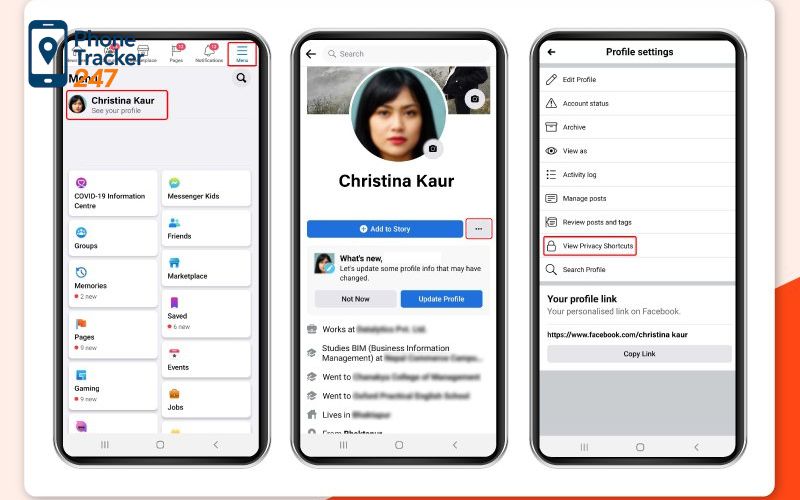
Through the Meta Family Center, parents can supervise Facebook and Messenger accounts without reading messages.
Available parental control features include:
- Viewing screen time and setting daily limits
- Managing contacts and message permissions
- Monitoring blocked accounts and pages
- Adjusting story visibility and privacy settings
These tools help parents understand usage patterns while respecting personal communication.
X (Twitter) Safety Settings for Teens
X does not offer dedicated parental control tools, but safety settings are available.
Parents can help teens:
- Enable sensitive media warnings
- Restrict who can send direct messages
- Control account discoverability and privacy
- Understand age-based consent requirements
In some regions, parental consent may be required for teen accounts.
Pinterest Parental Controls
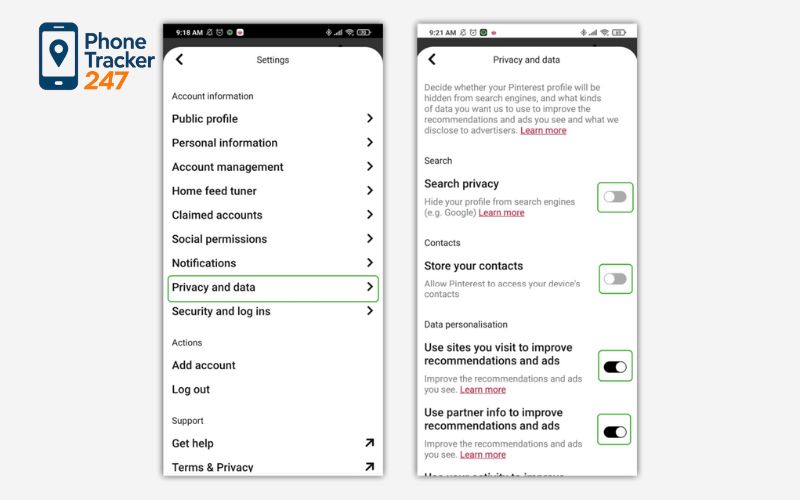
Pinterest restricts users under 13 and applies additional safety measures for teens.
Parents can:
- Lock privacy and account settings with a passcode
- Ensure accounts under 16 are private by default
- Filter comments using keyword lists
- Customize home feed topics to show age-appropriate content
These settings help limit exposure to unsuitable material while encouraging positive exploration.
Skype Parental Controls
Skype offers basic safety controls for users aged 13 and above.
Parents can:
- Limit profile visibility
- Restrict contact permissions
- Block or report unwanted users
- Control search discoverability
These features help prevent unsolicited contact and spam calls.
FaceTime Parental Controls on Apple Devices
FaceTime parental controls are managed through Apple’s Screen Time settings.
Parents can:
- Restrict FaceTime usage entirely
- Limit approved contacts
- Set communication time windows
- Apply content and privacy restrictions
These settings apply across all Apple devices linked to the child’s account.
Table 2: Popular Options for Social Media Monitoring and Control
| Rank | Solution | App limits and schedules | App install approvals | Web/content filtering | Social media alerts (high-level) | Location features | Cross-platform | Notes |
|---|---|---|---|---|---|---|---|---|
| 1 | PhoneTracker247 | Yes | Yes (where supported) | Yes (where supported) | Yes (varies by plan and OS limits) | Yes | iOS + Android | Best “all-in-one” choice for families managing multiple devices |
| 2 | Apple Screen Time (iOS/iPadOS) | Yes | Yes | Limited (focused on iOS settings) | Limited | Limited | Apple only | Strong for iPhone routines, simple and built-in |
| 3 | Google Family Link (Android) | Yes | Yes | Limited (depends on services and browser) | Limited | Yes | Mainly Android | Great for Android kids and beginner setup |
| 4 | Qustodio | Yes | Yes | Yes | Limited to moderate (plan-dependent) | Plan-dependent | iOS + Android | Solid general parental control suite |
| 5 | Bark | Limited to moderate | Limited to moderate | Limited to moderate | Strong focus on alerts (plan-dependent) | Plan-dependent | iOS + Android | Better for families prioritizing warning signals over strict blocking |
| 6 | Net Nanny | Yes | Limited to moderate | Strong focus | Limited | Limited | iOS + Android | Often chosen for filtering-first households |
Best Practices for Parental Control Social Media
Parental control social media tools are most effective when combined with communication and education.
Parents should:
- Talk openly about online risks and expectations
- Review settings regularly as apps update
- Encourage children to report uncomfortable experiences
- Avoid secret monitoring that damages trust
- Adjust controls as children mature

Supporting Parental Control Social Media with PhoneTracker247
Built-in parental control features on social media platforms provide a helpful starting point, but they often leave gaps – especially when children use multiple apps, switch devices, or communicate across different platforms. This is where a broader, family-focused monitoring approach becomes valuable.
PhoneTracker247 is designed to help parents gain clearer insight into their child’s digital activity without resorting to invasive surveillance. Instead of focusing on reading every message, the platform emphasizes usage patterns, behavioral signals, and early warning signs that may indicate potential risks related to social media use.
With PhoneTracker247, parents can:
- Monitor overall social media activity trends across devices
- Identify unusual usage patterns that may signal stress, harassment, or risky interactions
- Receive alerts related to suspicious behavior while respecting privacy boundaries
- Manage monitoring from a centralized dashboard, even when not physically present
PhoneTracker247 complements existing parental control social media tools by providing an additional layer of visibility and context. This allows parents to respond earlier, communicate more effectively, and support healthier digital habits as children grow.
By combining platform-level controls, open family communication, and responsible monitoring tools like PhoneTracker247, parents can create a safer, more balanced social media environment – one that prioritizes protection, trust, and long-term digital well-being.
FAQs – Parental Control on Social Media
1. What are the best parental controls for social media in 2026?
Use Screen Time or Family Link for limits and schedules, plus each app’s teen safety settings for privacy. PhoneTracker247 helps if you want one dashboard across devices.
2. Should parents block social apps or set time limits first?
Set time limits first. Block only the apps that repeatedly cause issues.
3. Can parents protect kids without reading DMs?
Yes. Tighten privacy, restrict who can message, and set “no social” hours.
4. What settings should be enabled first on a new teen account?
Private profile, restricted DMs, limited comments/tags, and stronger account recovery controls.
5. How can parents reduce cyberbullying risk fast?
Limit contact to friends only, report quickly, and block offenders. Save evidence if it escalates.
6. What are warning signs a child needs stronger limits?
Sleep loss, secrecy, mood changes after scrolling, and sudden new online “friends.”
7. How do you manage social media rules across iPhone and Android?
Keep the same allowed apps, daily limits, and bedtime cutoff on both systems.
8. How often should parents review social media controls?
Monthly, and anytime there’s a new device or major app update.
Conclusion
Parental control social media tools play an important role in protecting children in today’s digital environment, but they work best when supported by broader monitoring solutions. No single platform can address every risk, which is why many parents explore apps to monitor kids phones to gain a more complete view of their child’s digital activity.
By understanding how parental controls function across different social media apps and combining them with responsible monitoring tools, parents can help children develop safe, confident, and healthy online habits—both now and as they grow more independent.
Quick Summary Table
| Goal | Do this first | Best tool type | Parent tip |
|---|---|---|---|
| Stop late-night scrolling | Set bedtime cutoff + downtime | OS controls (Screen Time / Family Link) | Keep phones out of bedrooms |
| Reduce stranger contact | Private profile + DM restrictions | In-app teen safety settings | Recheck settings after updates |
| Prevent “app hopping” | Same rules across devices | Cross-platform dashboard | One rulebook for iPhone + Android |
| Lower cyberbullying risk | Friends-only contact + quick reporting | In-app controls + family rules | Save evidence if it escalates |
| Build long-term judgment | Weekly 10-minute check-in | Family agreement | Focus on patterns, not punishments |
If you want one clear system that keeps limits, routines, and visibility consistent across devices, make PhoneTracker247 your family’s control center. Set daily limits, enforce bedtime cutoffs, standardize rules for iPhone and Android, and keep everything organized in one place so your child’s social media habits improve without constant arguments. Start with your top 2 rules today, then tighten settings only where real risk shows up.
For daily updates, subscribe to PhoneTracker’s blog!
We may also be found on Phone Tracker App on Facebook!