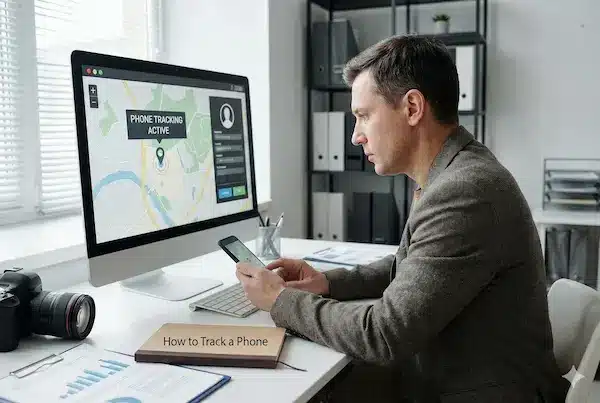
Most of us have stared at a blue dot on a map and wondered if it was telling the truth. Sometimes it feels spot on, sometimes it jumps, freezes or tells a different story from the person you are talking to. As more families and teams rely on live cell phone tracking, that tiny dot now sits at the center of planning, safety and arguments about who was really where.
Contents
- 1 Why Live Cell Phone Tracking Is Everywhere
- 2 What Live Cell Phone Tracking Really Is Today
- 3 The Crisis Of Trust – Why People Doubt The Blue Dot
- 4 What Live Cell Phone Tracking Can And Cannot Show
- 5 Core Use Cases Where Live Cell Phone Tracking Really Helps
- 6 How Live Cell Phone Tracking Actually Works
- 7 Privacy, Consent And Legal Limits In Live Cell Phone Tracking
- 8 Choosing The Right Live Cell Phone Tracking Setup
- 9 What To Look For In A Live Cell Phone Tracking App
- 10 Communication Around Live Cell Phone Tracking
- 11 Case Studies – How Live Cell Phone Tracking Builds Or Breaks Trust
- 12 FAQs – Live Cell Phone Tracking
- 13 Designing Trustworthy Live Cell Phone Tracking
Why Live Cell Phone Tracking Is Everywhere
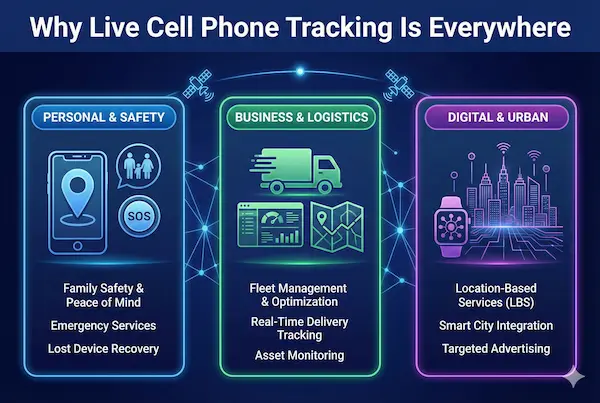
Live location used to be something you turned on for a trip. Now live cell phone tracking is baked into maps, ride sharing, delivery apps and family safety tools. It quietly runs in the background of a normal day, even when nobody mentions it out loud.
1. How smartphones turned live cell phone tracking into a default layer
Modern phones constantly combine GPS, Wi Fi and cell tower data to work out where you are. Apps then tap into that stream to show directions, find drivers or let trusted people see your live position. Over time, this turned live location from a special option into something people simply expect to work.
2. Everyday situations shaped by live phone location
Parents check a child on the way home instead of calling three times. Friends share location to meet in a crowd. Dispatchers watch field staff on a map to give realistic arrival times. When it works, nobody thinks about the tech. When it fails, stress and suspicion show up fast.
3. Why the old “call and ask where you are” model no longer scales
Calling everyone for an update does not work once you have teens in different places, staff spread across a city and multiple deliveries on the road. It creates noise, delays and tension. Live cell phone tracking grew because one calm glance at a map can, in theory, replace a dozen anxious messages. The challenge now is making that glance something people can actually trust.
What Live Cell Phone Tracking Really Is Today
Before we get into laws, policies or relationship drama, it helps to pin down what live cell phone tracking actually does in real life, and where people often misunderstand it.
1. Simple definition of live cell phone tracking
In plain language, live cell phone tracking means a phone shares its location with a trusted service at short, regular intervals so someone with permission can see it on a map. The phone collects location from GPS, Wi Fi and cell towers, sends that data over the network to a server, and the app turns it into a moving dot or route that updates as the person travels. It is “live” in the sense of being refreshed often, not in the sense of being perfect to the exact second or exact meter.
2. What people expect vs what live tracking can actually deliver
Many people quietly expect live tracking to be a flawless, real time lie detector: always precise, never delayed and able to settle any argument about where someone was. In reality, maps round positions, signals bounce, buildings block GPS and phones save power by slowing updates. Live cell phone tracking is usually good enough to show the right area, direction and rough timing, but not to prove intent or reconstruct every step without context. When you treat it as a helpful signal instead of a final verdict, it makes far more sense.
3. One paragraph quick answer for busy readers
If you only remember one thing, remember this: live cell phone tracking is a system where a phone you control or have consent to monitor sends its location to a secure service so approved people can see roughly where it is in near real time. It is great for safety, planning and logistics, but it has limits, gaps and delays, and it does not replace honest conversations or clear rules about privacy.

The Crisis Of Trust – Why People Doubt The Blue Dot
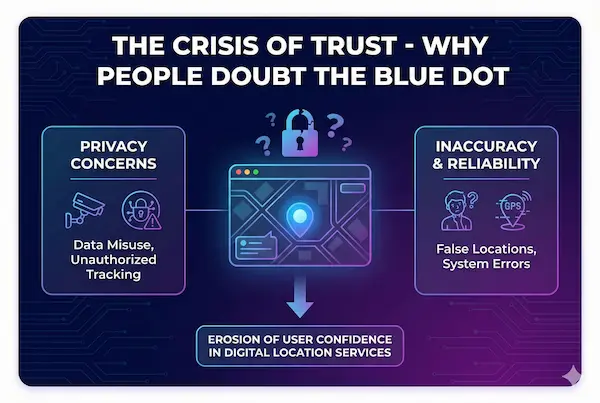
The more people depend on live cell phone tracking, the more they notice the moments when it seems to be wrong. A few bad experiences are often enough to turn a helpful feature into something they distrust or even resent.
1. When the map says one thing and the person says another
Almost everyone has lived through the awkward scene: the map shows someone still across town while they swear they are already outside, or it shows a teen “stuck” somewhere long after they have moved on. For the person watching, the blue dot feels like proof. For the person being tracked, it feels like an unfair accusation based on a glitch. After a few rounds of “the app says…” versus “I told you…”, trust shifts from the human story to the screen, or in the opposite direction, and both sides feel misunderstood.
2. How glitches and delays quietly erode confidence
Most technical problems are small on their own: a delayed update in bad signal, a bounce to the wrong street, a frozen dot when the app is backgrounded. The issue is that people rarely see the cause, only the mismatch. Over time, these little surprises chip away at confidence in live cell phone tracking. Some users start ignoring the map completely. Others stare at it more intensely, trying to catch every inconsistency and “read between the lines”, which only adds more stress.
3. The emotional side of watching and being watched
Location data is not just numbers on a server. For the watcher, a moving dot can ease anxiety or fuel suspicion. For the person being watched, knowing that someone might be checking their position can feel protective in one moment and suffocating in the next. When trust is already fragile, even a small discrepancy on the map can trigger bigger arguments about honesty, control and freedom. The crisis is not just about whether the technology is accurate, but whether the people using it feel it is fair, respectful and worth believing.
What Live Cell Phone Tracking Can And Cannot Show
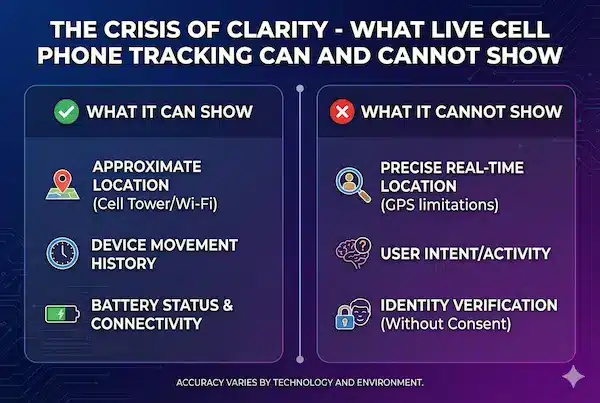
A big part of the problem is not the data itself, but how people read it. Many arguments around live cell phone tracking start because someone assumes the blue dot can answer questions it was never designed to solve. To make better decisions, you need a clear picture of what the system actually tells you and where its limits are.
1. What live cell phone tracking can reliably tell you
Used properly, live cell phone tracking is very good at a few core things. It can show roughly where a phone is, which direction it is moving and how fast it is getting from one known place to another. It can help you see whether someone is on the way, delayed or completely off a usual route. For families and teams, that is often enough to calm nerves, plan better and respond faster when something looks wrong.
2. What it cannot show – intent, context and private life
What the map cannot see is intent. It cannot tell you why someone stopped, who they are with, what they are doing or how they feel. A dot near a bar does not prove anything about what happened inside. A pause on a side street does not explain the reason. Treating live cell phone tracking as a window into someone’s private life or motives almost always leads to overreach and misunderstanding.
3. The danger of over interpreting the route and the blue dot
When emotions are high, it is tempting to zoom in, replay every turn and build a full story from a simple route line. That is where trouble starts. Small errors, GPS jumps or normal detours can be read as lies or deliberate avoidance. The more weight you put on every tiny movement, the easier it is to make accusations that the data cannot actually support. Live location works best when you treat it as one useful signal to combine with conversation and context, not as a perfect, all knowing judge.
Core Use Cases Where Live Cell Phone Tracking Really Helps
Used with consent and simple rules, live cell phone tracking quietly solves a lot of real problems instead of creating new ones.
1. Families and caregivers
Parents can see a child get from school to home without constant calls. Caregivers can check that an elderly relative is following their usual route and find them quickly if they need help. When everyone knows tracking is for safety, not a secret test, it becomes a calm background tool.
2. Field teams and service staff
For drivers and technicians, live location helps dispatchers assign jobs, give honest ETAs and spot when someone is stuck or off route. With clear policies, work devices and tracking limited to shift hours, it feels like professional coordination, not spying.
3. High value assets and important trips
Tracking vehicles, equipment or luggage lets you react fast when something goes missing, breaks down or takes a wrong turn. Here the focus is on protecting assets and service quality, with clear communication to anyone whose phone is part of that tracking chain.

How Live Cell Phone Tracking Actually Works
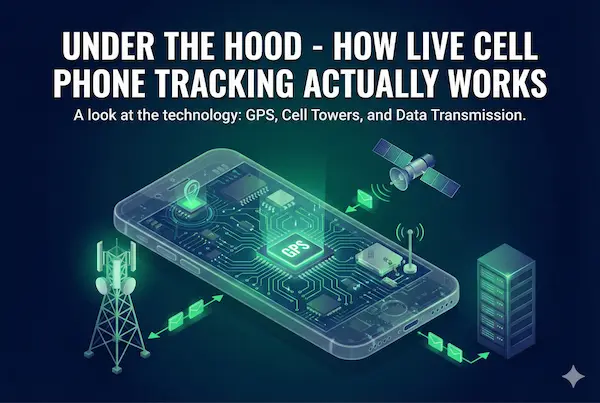
To rebuild trust, it helps to see what is really happening behind that moving dot. Live cell phone tracking is not magic or spying by default. It is a chain of sensors, software and servers that all have limits as well as strengths.
1. From sensors to the blue dot
A modern phone does not rely on one signal. It combines GPS satellites, Wi Fi networks, Bluetooth beacons and cell towers to estimate where it is. The operating system then turns that estimate into a point on the map. In open areas with good sky view, GPS does most of the work. Indoors or in cities with tall buildings, Wi Fi and cell towers often take over. This mix explains why location can be sharp in one place and fuzzy or jumpy in another.
2. How apps send and store live location data
Once the phone has a position, the tracking app packages that data with a time stamp and sends it over the network to a server. The server stores recent points, builds routes and shows them to people who have been given access. To save battery and data, most apps do not send every step. They update at intervals, when you move a certain distance or when something important changes. That is why live cell phone tracking often feels close to real time, but not perfectly frame by frame.
3. Why battery, signal and settings change what you see
What you see on the map depends heavily on the phone’s state. Low battery modes may slow or pause updates. Weak mobile data can delay points so they appear in a burst later. Turning off location, blocking background activity or using aggressive task killers can all freeze the dot even while the person is moving. When you understand how power, signal and settings affect tracking, it becomes easier to tell the difference between someone hiding and a phone that is simply not able to report properly.
Privacy, Consent And Legal Limits In Live Cell Phone Tracking
Once you start using live cell phone tracking, the questions stop being purely technical. Who is being tracked, who can see the data and whether everyone agreed to it will decide if your setup feels safe and fair or creepy and risky.
Legal and privacy snapshot – when live cell phone tracking is acceptable
| Context | Usually acceptable? | Conditions for safer use | Risk level if misused |
|---|---|---|---|
| Your own phones and tablets | Yes | You control the device and the account | Low |
| Young children / dependants | Often yes | Clear safety purpose, simple explanation as they grow older | Low to medium |
| Elderly relatives needing help | Often yes | Explain purpose, option to opt out or pause when they choose | Medium if hidden |
| Company devices and vehicles | Often yes | Written policy, work hours only, data limited to business needs | Medium if rules are vague |
| Adult partners / relationships | Usually no if done in secret | Only with consent and clear, mutual agreements | High if secret or coercive |
| Staff personal phones | Usually risky | Avoid or use only with explicit, documented consent | High |
| Strangers or casual contacts | Almost never | No legitimate purpose in normal situations | Very high |
1. When live tracking is usually acceptable
In many places, tracking your own devices and company owned phones is widely accepted, especially when it is done for safety, recovery or clear business reasons. Parents and caregivers often use live location for younger children or dependants, and many businesses track delivery phones or fleet devices during working hours. The common thread is that the purpose is reasonable, the device is clearly part of that role and tracking is not treated as a secret trap.
2. When it crosses the line into surveillance
Problems start when live tracking is hidden from adults who reasonably expect privacy. Secretly following a partner, an employee’s personal phone or someone outside work hours can quickly move from “checking” into surveillance or stalking in the eyes of the law. Even if nobody ever files a complaint, using live cell phone tracking this way erodes trust and is hard to defend if it is discovered. If you would be afraid to explain your setup to the person being tracked or to a lawyer, that is a strong warning sign.
3. Building consent based rules for families and teams
A safer approach is to treat tracking like any other serious tool: you talk about it, write down simple rules and stick to them. For families, that might mean agreeing when location sharing is on, who can see it and how to ask for a break. For teams, it usually means a clear written policy that covers which devices are tracked, during which hours, what the data is used for and how long it is kept. When everyone can read the rules and ask questions, live cell phone tracking becomes part of a transparent safety plan instead of a hidden source of fear or control.
Choosing The Right Live Cell Phone Tracking Setup
There is no single “right” way to use live cell phone tracking. The safest setups are the ones that match your relationships, your risks and how much visibility people are genuinely comfortable with.
1. Self tracking only – using live location as a safety net
In a self tracking model, the only phone you follow is your own. You use live location to find a lost device, share your route on a solo trip or prove you reached a destination if something goes wrong. Nobody else has permanent access by default. This keeps things simple: you get the benefits of live cell phone tracking as a personal safety tool without the emotional weight of watching or being watched every day.
2. Shared tracking in families – mutual, time bound visibility
In families, a common model is shared tracking with clear limits. Parents and kids agree when live location is on, such as school runs, late evenings or trips, and when it is off, such as at home or during private time. Older teens may share location with parents and close friends in both directions. Everyone knows who can see what and can ask to change the rules. Here, tracking is framed as a mutual safety feature, not a one way test of honesty.
3. Role based tracking at work – staff, managers and boundaries
At work, trust depends on clarity about roles. A role based model tracks company devices or vehicles, not private phones, and only during working hours. Managers see live maps and reports for their teams, while admins handle technical settings and security. Staff know which devices are monitored, why it is done and how long data is stored. When live cell phone tracking is tied to the job role instead of the person, it feels more like a professional tool and less like someone peering over your shoulder.
What To Look For In A Live Cell Phone Tracking App
If you are going to build trust around live cell phone tracking, the app you choose matters as much as the rules you write. A few key features make the difference between a tool you can depend on and something that only adds more doubt.
1. Accuracy, refresh speed and clear status
Good tracking does not need to be perfect, but it should be honest about what it is showing. Look for apps that refresh often enough for your needs, show when the signal is weak and make it clear if the phone was last seen a few minutes ago or an hour ago. Small status messages can prevent big misunderstandings.
2. Battery impact and offline behaviour
Any live tracking will use some battery, but it should not drain a phone by lunchtime. A solid app offers sensible power saving modes and explains what happens when the device is offline or out of coverage. You want predictable gaps, not mysterious disappearances.
3. Privacy controls, roles and data retention
A trustworthy app gives you control over who can see which devices, how long location history is stored and how to delete it. It should support different roles for parents, staff, managers or admins, with logs of who accessed what. These are the quiet details that turn live cell phone tracking from a black box into something you can explain and defend.
Feature checklist – designing trustworthy live cell phone tracking
| Feature | Why it matters | What to avoid |
|---|---|---|
| Clear accuracy info | Sets realistic expectations about location precision | Vague maps with no time or signal indicators |
| Refresh controls | Balances live updates with battery and data use | Fixed behaviour you cannot tune for your situation |
| Battery settings | Keeps phones usable all day | Apps that drain power with no explanation |
| Privacy controls | Lets you decide who sees what and when | One account with broad, unlogged access |
| History retention | Limits how long sensitive routes stay on the server | Unlimited history with no delete options |
| Access logs | Shows who looked at which device and when | No visibility into account or admin activity |
Communication Around Live Cell Phone Tracking
Even the best live cell phone tracking setup will fail if people only discover it by accident or hear about it in the middle of an argument. Trust comes less from the app itself and more from how you talk about using it.
1. How to explain live tracking to kids, teens, partners and staff
The key is to explain tracking before it becomes an issue. With kids, keep it simple: it is there to help adults find them quickly if something goes wrong. With teens, focus on independence and safety, not control, and listen to their concerns. With partners and staff, be direct about the purpose, when it is active and what you will not use it for. In every case, invite questions rather than pushing a finished decision with no discussion.
2. Setting expectations for glitches and reasonable use
You can avoid many fights by stating upfront that location will sometimes be wrong, late or missing. Agree that a single odd point on the map is a reason to talk, not to accuse. Decide how often it is reasonable to check the app and when it is better to send a message or make a call instead. When everyone shares the same expectations about what live cell phone tracking can and cannot prove, there is less room for shock and blame when the data does not match the story.
3. Handling conflicts when location history is part of the argument
There will be times when someone pulls up location history in the middle of a disagreement. When that happens, focus on what the data can actually show, ask for context and avoid using old routes as ammunition for new fights. If tracking keeps coming up in conflicts, it may be time to adjust the rules, reduce how much history you keep or pause some sharing until you can rebuild trust. The point of live tracking is to make people feel safer, not to give everyone a new weapon to use against each other.
Case Studies – How Live Cell Phone Tracking Builds Or Breaks Trust
Real stories show how live cell phone tracking can help or hurt, depending on how it is used.
1. Family case – from constant calls to calm check ins
A mother used to call her teenage daughter several times on the way home. The daughter felt nagged, the mother felt ignored. They agreed to use live location only during the school run and early evening. Calls dropped, tension eased and both said it felt better to have clear rules instead of constant ringing.
2. Workplace case – hidden tracking vs clear policy
A small service company secretly installed a tracking app on drivers’ personal phones. When one driver noticed it, trust collapsed. The owner removed it, switched to company devices and wrote a short fleet tracking policy. Once staff could see their own routes and knew why data was used, live tracking became normal and complaints faded.
3. Relationship case – recovering after secret tracking
One partner, worried about late nights, installed a hidden tracker after reading about it online. Battery problems exposed the app and the real issue became feeling watched, not one specific night out. They removed the tool, agreed that any future live cell phone tracking would have to be mutual and time limited, and chose to rely more on talking than on maps.
FAQs – Live Cell Phone Tracking
1. What is live cell phone tracking in simple terms?
It is when a phone shares location updates at short intervals so approved people can see its position on a map in near real time.
2. Is live cell phone tracking accurate enough to trust every detail?
Not every detail. It is usually good for area, route, and timing, but small delays or jumps can happen—especially indoors or in dense cities.
3. What signals does live tracking use?
Modern phones combine GPS, Wi-Fi, Bluetooth beacons, and cell towers to estimate location.
4. Why does the map dot freeze or jump sometimes?
Weak signal, low-power mode, blocked background activity, or location settings can delay or pause updates.
5. Does live cell phone tracking always drain battery fast?
Not always. It uses power, but a well-designed app can manage update frequency to reduce battery drain.
6. Does live tracking always require an app on the phone?
Usually yes. A built-in service or installed app needs location permission to send data to a server.
7. Is it legal to track someone’s phone without consent?
For adults, secret tracking is often risky and may violate privacy or stalking laws. The article recommends assuming consent is required.
8. What can live tracking show—and what can’t it show?
It can show rough location, direction, and timing, but it cannot show intent, private context, or the full story behind a stop.
9. What are the best use cases for live cell phone tracking?
The article highlights families/caregivers, field teams, and tracking high-value assets or important trips.
10. What makes a live tracking setup trustworthy?
Clear consent, simple rules, privacy controls, limited history retention, and honest communication about glitches and boundaries.
Designing Trustworthy Live Cell Phone Tracking
In the end, the problem is not the blue dot. It is how we choose to use live cell phone tracking – as a secret way to control people, or as a clear, shared tool for safety and planning.
Quick summary – what really matters in live cell phone tracking
| Question | Short answer |
|---|---|
| What is it for | Safety, planning and recovery – not spying or secret tests |
| When it works best | With consent, simple rules and clear limits on who sees what |
| Biggest risks | Hidden tracking, vague policies and keeping too much history |
| What to design for | Trust, explainable choices and just enough data to stay safe |
| First step to improve your setup | Audit your apps, write basic rules, run a small transparent pilot |
Next steps – run a small, honest pilot with PhoneTracker247
You do not have to start from zero. First, review what you already have: which apps are installed, which phones are being tracked, who can log in and how long history is stored. Remove any tool you would not feel comfortable explaining to your family or your team.
Then design a small, transparent pilot with a clear, policy based solution like PhoneTracker247 on agreed devices only, under written rules about when tracking is on, who can see location and how long data is kept.
For daily updates, subscribe to PhoneTracker’s blog!
We may also be found on Facebook!