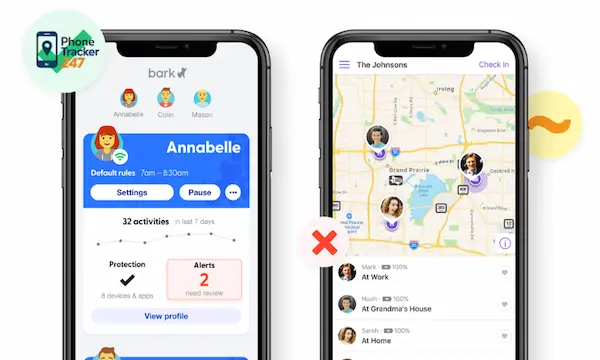
Choosing between Bark vs. Life360 can feel like choosing between two different parenting philosophies. One leans harder into digital supervision, while the other focuses more on real-world location safety and driving visibility. That difference matters because most families are not just asking how to track a phone. They are asking how to protect a child across texts, apps, school runs, and everyday routines. In this guide, we break down Bark and Life360 in plain language, compare where each one works best, and explain when families may need a broader dashboard approach with PhoneTracker247 for more centralized monitoring and device oversight.
What Bark does best
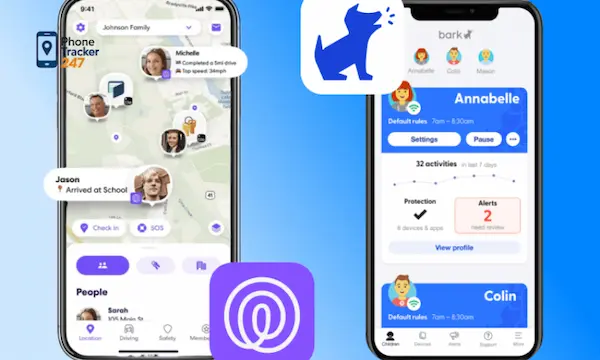
Bark is strongest when the goal is digital parenting rather than only GPS awareness. Its app and related products emphasize screen time management, website and app blocking, content filtering, and alerts around potentially harmful online interactions. Bark also supports live GPS, check-ins, and location alerts, but those features sit inside a broader parental control framework.
Content monitoring and online safety
This is Bark’s clearest differentiator. The platform is designed to help parents detect warning signs tied to digital life, rather than simply showing a dot on a map. That can make a real difference for families worried about messages, online risks, and age-inappropriate content.
Key strengths include:
- Content-focused alerts: Bark says it monitors connected devices and accounts for potentially harmful activity, then sends alerts when issues are detected.
- Filtering and blocking: Bark highlights the ability to block websites and apps, manage screen time, and filter inappropriate content.
- Broad device coverage: Bark states compatibility across iPhone, iPad, Android, laptops, computers, Chromebooks, and Amazon Fire tablets.
Parent controls across dedicated hardware and software
Bark has expanded beyond a simple app model. Its ecosystem includes the Bark Phone, Bark Watch, and Bark Home, which pushes it closer to a family control platform than a standalone parental control app. For some households, that creates a more structured environment from day one.
That matters because some families do not just want alerts after something happens. They want tighter control over internet access, app availability, and device behavior before problems escalate.
What Life360 does best
Life360 is strongest when the goal is family coordination, location awareness, and driving safety. Its positioning centers on real-time location sharing, place alerts, location history, and safety tools that help families stay connected during daily routines.
See more: Best Family Locator App Without Subscription: 2026 Safety Guide
Location tracking and arrival awareness
Life360’s core use case is simple and practical. You want to know whether your child got to school, whether a spouse made it home, or whether a teen driver is still on the road. That is where Life360 feels natural and low-friction.
Its core advantages include:
- Live location sharing: Life360 uses location permissions to power map visibility inside a family circle.
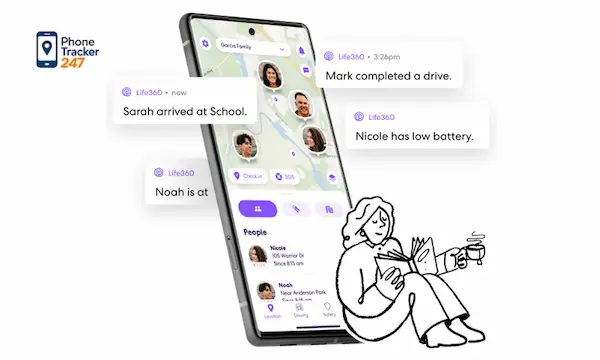
- Place Alerts: The service supports notifications when someone arrives at or leaves saved places.
- Location history tiers: Current public plan pages show different history windows depending on membership level, from 2 days on Free to longer histories on paid plans.
Driving safety features
Life360 also stands out for driving-related tools. The company promotes family driving summaries, crash detection, and distracted driving prevention features. That makes it more compelling for households with teenage drivers than for households focused mainly on content filtering.
If your biggest concern starts with, Did they get there safely, Life360 is usually the clearer match.
Bark vs. Life360 feature comparison
Below is the practical difference most parents care about.
| Feature Area | Bark | Life360 |
| Primary focus | Parental controls and digital safety | Location sharing and family safety |
| Live GPS | Yes | Yes |
| Place/location alerts | Yes | Yes |
| Screen time tools | Strong | Limited emphasis compared with Bark |
| Website/app blocking | Yes | Not core positioning |
| Content filtering | Yes | Not core positioning |
| Online activity alerts | Core strength | Not primary focus |
| Driving reports | Not a main differentiator | Major strength |
| Crash detection | Not core positioning | Yes on supported plans/features |
| Best for | Parents managing digital behavior | Families managing travel and routines |
This side-by-side view is why the comparison can be misleading if someone asks which app is better in the abstract. Bark is better for online behavior management. Life360 is better for route, place, and driving visibility.
Pricing snapshot: Bark vs. Life360
Pricing can shift, so families should always verify before checkout. As of the latest public pricing pages, Bark App Premium is listed at $14 per month or $99 per year, while Bark Jr is listed at $5 per month or $49 per year. Bark also offers additional hardware-based options like Bark Home, Bark Phone, and Bark Watch under separate pricing structures.
Life360 currently shows a Free tier plus paid memberships, with public pricing pages listing Silver at $7.99 per month, Gold at $14.99 per month, and Platinum at $24.99 per month in at least some regions or plan pages. Free access includes a limited location history window, while paid tiers add more history and premium safety benefits.
| Plan | Publicly listed pricing highlights |
| Bark Jr | $5/month or $49/year |
| Bark App Premium | $14/month or $99/year |
| Life360 Free | $0/month |
| Life360 Silver | $7.99/month |
| Life360 Gold | $14.99/month |
| Life360 Platinum | $24.99/month |
Price alone should not decide this one. A cheaper location app is not a better value if you actually need digital supervision. In the same way, a stronger parental control tool may feel excessive if all you need is reliable family location sharing.

Which app is better for different family situations?
The cleanest way to answer Bark vs. Life360 is by household scenario.
Choose Bark if your concern starts online
Bark is usually the better fit when your questions sound like this:
- Is my child seeing risky or inappropriate content?
- Do I need app blocking and web filtering?
- Do I want screen time controls and digital behavior alerts?
- Am I trying to build stronger parental controls across several device types?
That is Bark’s lane, and it is why many parents compare it more with traditional parental control software than with pure location trackers.
See more: Tips to find my iPhone from my Android and locate the device easily
Choose Life360 if your concern starts with movement and travel
Life360 is often the better fit when your questions sound like this:
- Did they arrive at school, practice, or home?
- Where is my family right now?
- How is my teen driving?
- Do I need place alerts and crash-related safety tools?
That is where Life360 is more intuitive and more directly aligned with daily family logistics.
Consider a broader monitoring platform if you need both
Some families outgrow single-purpose apps. They want location awareness, but they also want visibility into calls, messages, browsing behavior, app activity, and centralized reporting. That is the gap where a broader device monitoring platform becomes more relevant.
PhoneTracker247 is positioned as an all-in-one phone tracker and parental control platform with a centralized dashboard, supporting location tracking, geofencing, app activity, browsing history, and other device oversight functions, while emphasizing lawful use, consent, and privacy. That broader model is useful when the goal is not just one safety layer, but a more complete view of device activity.
Final verdict on Bark vs. Life360
Bark vs. Life360 is really a question of depth in two different directions. Bark goes deeper into digital safety, parental controls, filtering, and online risk alerts. Life360 goes deeper into family location sharing, driving awareness, and real-world movement. Neither app fully replaces the other because they are designed around different priorities.
Explore PhoneTracker247 to see how our dashboard-based approach can help you monitor location and digital activity with more control, clearer visibility, and a setup built for lawful family device management.
For daily updates, subscribe to PhoneTracker’s blog!
We may also be found on Facebook!
FAQs – Bark vs Life360
1. Bark vs Life360: What is the difference?
Bark focuses on online safety; Life360 focuses on location tracking.
2. Is Bark better than Life360?
Yes, for digital parental controls.
3. Is Life360 better than Bark?
Yes, for GPS location and driving safety.
4. Does Bark track location?
Yes, but it is not its main feature.
5. Does Life360 monitor texts?
No, Life360 does not monitor text content.
6. Which is better for screen time?
Bark is better for screen time control.
7. Which is better for teen drivers?
Life360 is better for teen driving safety.
8. Can I use both apps?
Yes, they can work together.
9. Which app is best for online risks?
Bark is best for online safety alerts.
10. Which app should parents choose?
Choose Bark for online safety; choose Life360 for location tracking.